1-Visitor
October 18, 2011
Solved

Hide a surface after a two-sided trim

  • October 18, 2011
  • 6 replies
  • 2642 views

Hi all

This is probably a simple one. If I trim a surface and keep both parts, how can I hide one of those parts?

Thanks

Best answer by MartinHanak

David,

you can select red or yellow surface portion, click RMB and use Hide command. Then you can see what item was hidden in Model Tree. I attached part created in WF5.
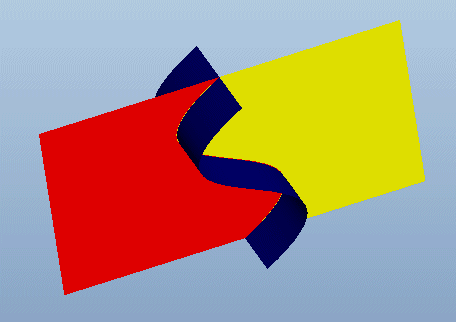
hide_trim_surf.gif

Martin Hanak

6 replies

1-Visitor
October 20, 2011

Hi David,

i just tried this & had no problem. I created a flat surface & performed a trim, keeping both sides of the quilt. I then picked one of the 2 surfaces (in the graphic area or the model tree) & right clicked "hide". It worked on this simple surface, maybe on something more complex it will not.

Hope this helped

Regards

John

12-Amethyst
October 21, 2011

Hi David,

If I understand you correctly you are trimming one surface with another surface and you want to have the choice of seeing either side of the surface being trimmed and/or seeing the triming quilt.

If this is the case then for WF4 or 5 (and probably all WF) then the dashboard for the trimming operation will give you a choice of which side you keep (you can choose by the arrow in the graphics window or the toggle arrow in the dashboard) and after the event you need to go back to redefine (edit definition) and make that choice.

For the trimming surface the default is to leave this visible but in the dashboard there is a choice to remove the trimming quilt either when you are making it or redefining it.

Not sure if this helps you.

Regards, Brent

24-Ruby III
October 21, 2011

David,

you can select red or yellow surface portion, click RMB and use Hide command. Then you can see what item was hidden in Model Tree. I attached part created in WF5.

hide_trim_surf.gif

Martin Hanak

David_M1-VisitorAuthor
1-Visitor
October 21, 2011

Thanks everyone. Martin's solution does work and is a good demonstration of how Pro/E handles each half with regard to the model tree. I'll see how I go with this in more complex models.

Thanks

David_M1-VisitorAuthor
1-Visitor
October 21, 2011

OK, so while the simple solution works, when I right click this surface, all I get is Unhide. But it's not hidden yet. What's going on?

Thanks

Untitled3.png