
14-Alexandrite
July 14, 2023
Solved

Hole axes from thickened quilt

  • July 14, 2023
  • 2 replies
  • 3714 views

Hello,
I am attempting to create three holes in the thickened version of a quilt. The most reliable method I have found is by trimming the quilt as shown below however this results in no hole axis being formed making subsequent work on it harder. 
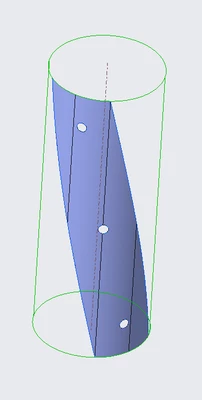
IbrahimTayyab_0-1689343281794.png

I was having difficulty created holes using the hole tool because of the rounded geometry and the breaks in the surface.
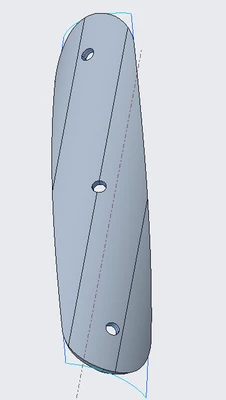
IbrahimTayyab_1-1689343536864.png


What would be a reliable way to

a) Get hole axes when creating objects this way (ie thickening trimmed quilts)?

b) Place holes on a surface such as this? 


The quilt is made by wrapping a sketch on cylinder on creo paramteric 9.0 student version.
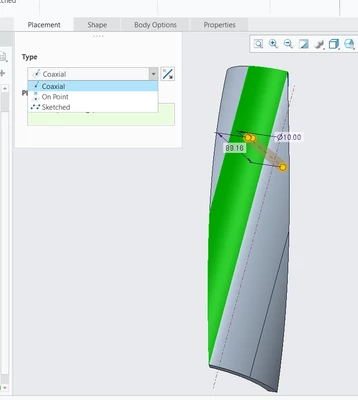
Best answer by MartinHanak

@IbrahimTayyab wrote:

I have created a section of a cylinder by using sketch, wrapping said sketch onto the cylinder and then using boundary blend to create a quilt. Removing the cylinder and then thickening said quilt. This thickened section has broken surfaces and the hole interface looks like this.

IbrahimTayyab_0-1689345251552.png


I have attached the file below for reference.


Hi,

probably you created geometry which is not cylindrical. In my test model I was successful. See video.

2 replies

Dale_Rosema
23-Emerald III
23-Emerald III
July 14, 2023

Does the hole axis need to be through the vertical axis of the wrap?


Could you create a plane offset just outside (or inside) of the quilt and extrude your hole from that?


Repeat this for the other two holes?

14-Alexandrite
July 14, 2023

I am not sure I follow, I understand the axes would look like this, creating planes would be quite hard would it not? I am somewhat new to creo, I would appreciate it if you could maybe break it down further?

IbrahimTayyab_1-1689345969479.png


tbraxton
22-Sapphire II
22-Sapphire II
July 14, 2023

Here is a video for creating a hole on a cylinder. You can choose your own references to place a point on the cylinder to match your design intent. This is just an example of how to do it. Note that the axis is included when the hole is created. The hole axis is normal to the cylinder surface.


You need to be aware that Creo splits cylinders in half, if a feature straddles or moves across the split then this can cause regeneration issues.

24-Ruby III
July 14, 2023

Hi,

you can create hole on cylindrical surface.

MartinHanak_0-1689344463577.png

51.96 is distance from top plane surface.

14-Alexandrite
July 14, 2023

I have created a section of a cylinder by using sketch, wrapping said sketch onto the cylinder and then using boundary blend to create a quilt. Removing the cylinder and then thickening said quilt. This thickened section has broken surfaces and the hole interface looks like this.

IbrahimTayyab_0-1689345251552.png


I have attached the file below for reference.


Dale_Rosema
23-Emerald III
23-Emerald III
July 14, 2023

Thanks for attaching the files, but since you are on a student version of the software. Most of us on this board cannot open your files.