
1-Visitor
November 21, 2014
Question

Hole feature deletes entire part!

  • November 21, 2014
  • 15 replies
  • 4220 views

Anyone seen a case where placing a hole feature in a existing boss with a pilot hole deletes the entire part?

First image shows the first two holes placed with the third pilot hole and all of the surrounding part geometry.
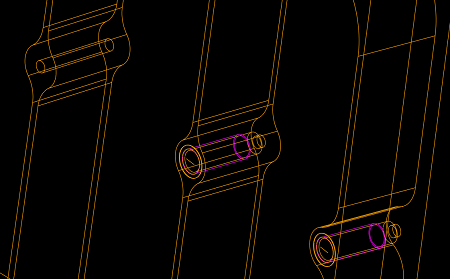
two+boss+holes.bmp

Second image shows third hole placed deleting the entire part except the hole itself.
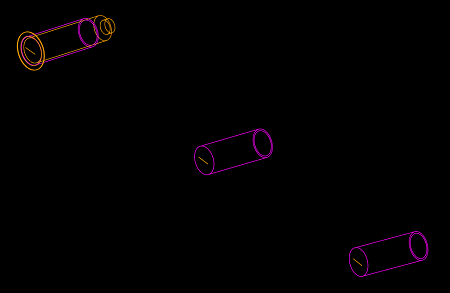
three+boss+holes.bmp

Regards,

Patrick


This thread is inactive and closed by the PTC Community Management Team. If you would like to provide a reply and re-open this thread, please notify the moderator and reference the thread. You may also use "Start a topic" button to ask a new question. Please be sure to include what version of the PTC product you are using so another community member knowledgeable about your version may be able to assist.

15 replies

17-Peridot
November 22, 2014

Nope, that should not have happened. Did you try changing the accuracy fo the model?

pstapler1-VisitorAuthor
1-Visitor
November 22, 2014

Yes. We are required to model at Absolute .0005. However, I tried A.001, A.002, A.003, A.005, and R.001. All yield the same results. Oddly it isnt just that location. This part has hundreds of these bosses. The hole feature will go into most of the bosses I have tried without deleting the entire part. It only occurs in certain bosses. However, they are in random locations throughout the part.

May have to call PTC!!!

pstapler1-VisitorAuthor
1-Visitor
November 22, 2014

What I have noticed is if I place the hole all the way through the part it doesnt have the same affect. Additionally, if I place a extruded cut in those same locations to a specified depth it still deletes the part. However, if I place the cut through all it does not delete the part.

21-Topaz II
November 22, 2014

I have seen this on occasion. It shouldn't happen, but it usually has to do with the dimensions of the new feature and proximity to edges or vertexes in the part. Nothing jumps out in your screen shots, but I'd try tweaking the dims of the feature to see when it causes the trouble, that can lead you to a solution.

I'd also look for other geom checks in the part. My experience is that a geom check that seems to regen how you want still means that Creo is guessing about what should happen and happens to be guessing right. It can lead to odd results like this later down the tree sometimes. Resolve those and you may clear this up.

17-Peridot
November 22, 2014

This is the exact reason very clients maintain their support contracts. This needs to be reported if for no other reason to have PTC acknowledge that these types of things are still happening; just in case someone snuck in there and ticked off the "done" box on something that is far from resolved.

Patrick, what version are you using?

I still have a nasty bug on patterned features that would disappear instances on random locations of the pattern. I drove that one through support team to resolve. They said it was resolved in M050 and sure enough, it popped back up in M090 IIRC. Sometimes it is easier to live with a bug than to find new ones that stop you dead in your tracks.

The only other option is a revolve. Again, none of this should be necessary. As Doug said, you may have to backtrack to the place the hole surface was created. Most likely, this is the culprit. You can also try moving the pilot holes to after these hole features or removing them all together. I have seen instances in some functions that did not like origins floating in space. Something like the Auto Remove switch setting can get confused.

Anyway, I hope you get a chance to report it and let PTC fix their issues. When I have a feature I need, I don't like having to tweak it just so the software will accept it.

pstapler1-VisitorAuthor
1-Visitor
November 24, 2014

2.0 M120

No other geom checks in model.

Turns out it is related to (or at least it goes away) the formed state of the part (Flatten-Quilt). The hole can be placed in the flat state with no problem. However, it seems it would be a problem with all of the holes in the rolled state rather than a select few locations if it is truly related to the Flatten Quilt feature. The pilot holes are drilled on the flat part. The part is then rolled. Then the tapped holes are modeled. So basically how the part is actually built.

So...still confused.