

tbraxton
22-Sapphire II
22-Sapphire II
June 9, 2022
Question

Hole feature note using metric units for an inch thread in some cases

  • June 9, 2022
  • 2 replies
  • 3391 views

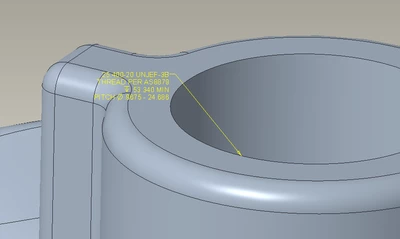
When placing a 1"-20 TPI hole in a model set to metric units the hole note is using metric values. I want to display inch values in the note. Does anyone have idea how to set this to display the inch values? Creo 7.07. I have also included the custom hole table used to create the feature for reference.
 

tbraxton_0-1654778633337.png

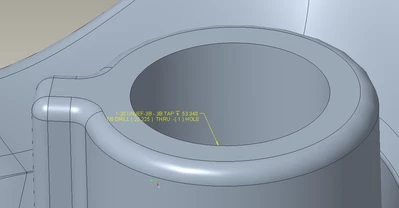
This is a hole created using the same feature and hole table in another model that is also in metric units and it displays inches.
tbraxton_1-1654779607726.png


2 replies

19-Tanzanite
June 9, 2022

You mention that the hole in the 2nd image was made in the same way as the hole in the 1st image, yet the note is different (looks like the standard Creo hole note)  So to clarify, you want the result shown in the 2nd image (1-20 instead of 25.400-20) ?

tbraxton
22-Sapphire II
tbraxton22-Sapphire IIAuthor
22-Sapphire II
June 9, 2022

Yes, the objective is to have the note look like the second image with inch units for the thread (1"-20").


Creo does not have standard holes for EF series threads out of the box AFAIK so that is why the hole table is in use. I believe that the hole was created the same way in both models and both reference the EF series hole table.

23-Emerald IV
June 9, 2022

It looks like the hole notes may be referencing different tokens and/or parameters.  Double check the syntax in each note.


TomU_0-1654782247393.png


tbraxton
22-Sapphire II
tbraxton22-Sapphire IIAuthor
22-Sapphire II
June 9, 2022

They are indeed different. I am not proficient with implementation of hole tables so is there a document that details how this would be controlled using the table?


tbraxton_0-1654782772213.png


tbraxton_1-1654782783072.png


23-Emerald IV
June 9, 2022

Documentation here:

https://support.ptc.com/help/creo/creo_pma/r8.0/usascii/#page/part_modeling/part_modeling/part_nine_sub/Thread_Notes.html#


Short answer:

  • If CALLOUT_FORMAT in the hol file is empty, Creo will use it's own built-in syntax.
  • If CALLOUT_FORMAT has some value, all holes created from that hol file will follow that syntax.
  • If a DEFAULT_CALLOUT_FORMAT_DATA table exists at the bottom of the hol file, that will be used instead of CALLOUT_FORMAT.