1-Visitor
October 14, 2017
Solved

How can I add BOM to a separate part in drawings?

  • October 14, 2017
  • 3 replies
  • 2441 views

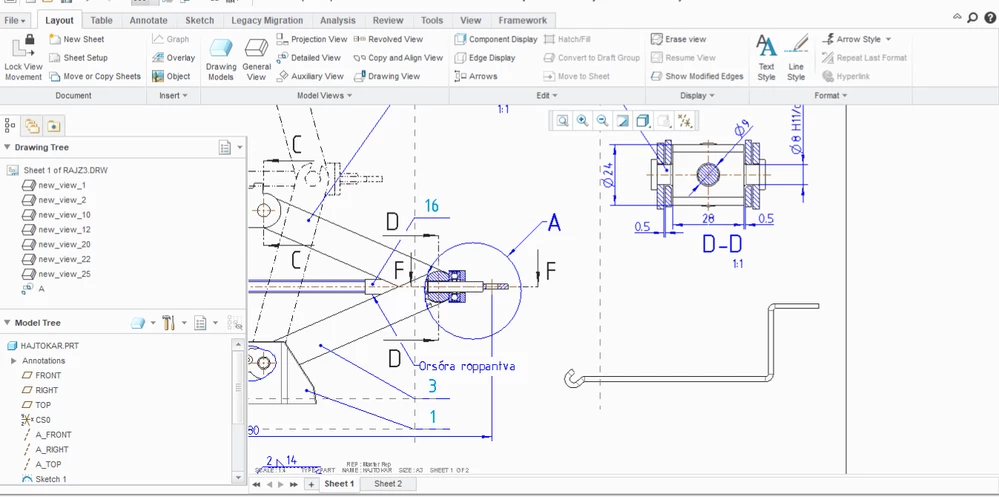
I've made an assembly drawing of a car jack, but I want do display the handle separately.
I don't know how I can display the BOM of the handle and add it to the BOM table. Is there any way to do it?carjack.jpg
Best answer by HamsterNL

This question seems to pop-up every once and awhile.

You have several options, none are ideal, and they all have their drawbacks


1. Blank components

https://community.ptc.com/t5/Creo-Modeling-Questions/Simplified-Reps-and-BOM-Balloons/td-p/427657

https://community.ptc.com/t5/Additional-Creo-Questions/BOM-Balloons-for-simplified-reps/td-p/111886


2. Use custom balloons

https://community.ptc.com/t5/Additional-Creo-Questions/BOM-Balloons-for-simplified-reps/m-p/111890/highlight/true#M9675


3. Temp drawings

https://community.ptc.com/t5/Additional-Creo-Questions/BOM-Balloons-for-simplified-reps/m-p/111892/highlight/true#M9677


4. Use "Fix Index" on multiple regions

Should be self-explanatory


5. Some more solutions which exploit bugs in Creo (which sadly have been fixed)

https://community.ptc.com/t5/Creo-Modeling-Questions/Create-a-BOM-index-between-Simplified-reps/td-p/62383/page/2


3 replies

HamsterNL
HamsterNL18-OpalAnswer
18-Opal
October 16, 2017
HamsterNL
18-Opal
October 16, 2017

...and now that I think of it...


You could also create an Exploded View, and only move the handle away of the car jack.

Place that exploded view twice on your drawing, make sure that in one view the handle is outside of your drawing border (thus showing only the car jack on the drawing), and that in the other view the car jack is outside of your drawing (thus only the handle is on the drawing).