5-Regular Member
March 19, 2025
Solved

How to auto-measure and save the measured data in Creo 8.0?

  • March 19, 2025
  • 3 replies
  • 2393 views

Hello everyone,

      I want to get a series of area data of a face, details are as follows:

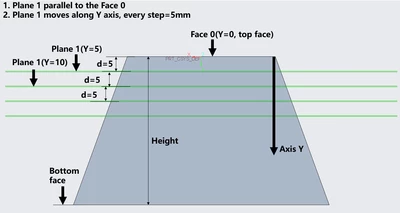
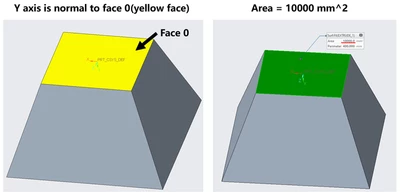
(1) the model is a square frustum, I want to get the area of the top face(Face 0, yellow face shown in the Figure 1) under different heights(distance between top face and bottom face, which is shown in Figure 2);

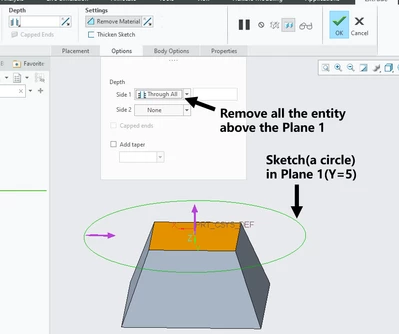
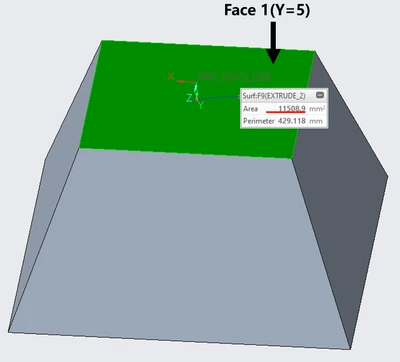
(2) I created a plane(plane 1 in Figure 2) which is parallel to the top face, a sketch created on the plane is extruded to remove the all the entity above the plane, and then I can get the area of new top face(shown in Figure 3 and 4);

(3) the plane moves along the y axis in certain step size, for example, d = 5mm, then I can get the area of top face in d=5, d=10,d=15..., besides, every time I get an area, I copy and paste it in a txt or word document.

The problem is: If the height is very large and the step size is very small, for example d = 0.5mm, in this situation, I need to do the same action so many times, it’s very time-consuming and annoying, is there a way that can auto-measure and save the data?

Thanks!
Lee_Msxfc_0-1742382830405.png

Figure 1


Lee_Msxfc_1-1742382848063.png

Figure 2


Lee_Msxfc_2-1742382863424.png

 Figure 3

Lee_Msxfc_3-1742382873946.png

Figure 4


Best answer by tbraxton

Yes, there are multiple ways you can do this. If you want to do it without writing code (external to Creo session) then this is one method.


First automate the "step" function.

If you review the method and models provided as the solution to this thread, you will be able to automate the stepping of the cuts. This analyzes the geometry changes of a solid rocket motor as it burns.

Solved: How to create multiple shapes with relation for a ... - PTC Community

If you create saved analysis for the area calculation, then it will update with each regeneration of a "step" in the model

You can save the results of each step following this method.

Article - CS32642 - How to save Analysis > measure information as a text file in Creo Parametric?


You can semi-automate this by using mapkeys (macros).


A second option that will be less up front work for you is.

If you have the BMX license, then you can also plot the area as a function of the cut plane location and create a graph for use/export.


3 replies

tbraxton
22-Sapphire II
tbraxton22-Sapphire IIAnswer
22-Sapphire II
March 19, 2025

Yes, there are multiple ways you can do this. If you want to do it without writing code (external to Creo session) then this is one method.


First automate the "step" function.

If you review the method and models provided as the solution to this thread, you will be able to automate the stepping of the cuts. This analyzes the geometry changes of a solid rocket motor as it burns.

Solved: How to create multiple shapes with relation for a ... - PTC Community

If you create saved analysis for the area calculation, then it will update with each regeneration of a "step" in the model

You can save the results of each step following this method.

Article - CS32642 - How to save Analysis > measure information as a text file in Creo Parametric?


You can semi-automate this by using mapkeys (macros).


A second option that will be less up front work for you is.

If you have the BMX license, then you can also plot the area as a function of the cut plane location and create a graph for use/export.


Lee_Msxfc5-Regular MemberAuthor
5-Regular Member
March 20, 2025

Thank you for your reply, I will try these methods and feed you back 🙂

21-Topaz II
March 19, 2025

For a square pyramidal frustrum, the length of a side is linear with respect to Y.

Length(y) = Length at Bottom + y * ((Length at Top) - (Length at Bottom))/Height

The area at any height is the square of the side length

Area(y) = Length(y) * Length(y)

If you're looking for a specific combination of geometric properties, it'd be better to just calculate it rather than iterating  with a Creo model.


Lee_Msxfc5-Regular MemberAuthor
5-Regular Member
March 20, 2025

Thanks for your answer, KenFarley.

Actually, what I presented is a simple model, , if the model becomes complicated, the area cannot be calculated by an equation, thus, I wish to find a method that can solve the problem in all situations.

24-Ruby III
March 20, 2025

Hi,

you can apply Measure and Regenerate commands in cycle (you can generate custom trail file and play it to execute the cycle). Values are written into trail file and you can extract them from it.

Please replay uploaded video. Hopefully you understand what I'm showing.

Lee_Msxfc5-Regular MemberAuthor
5-Regular Member
March 21, 2025

Hi, Martin Hanak, thank you very much, I will download and see how you do it.