

Question
How to avoid font mismatch while importing DXF in drawing ?
Hi..
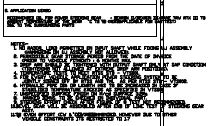
As we are getting many supplier drawing in DXF formats so while we import the DXF in drawing the text font get disturb or mismatch.
so is there any guideline we have to follow to avoid such issues. OR is there any process to import DXF properly in drawing. ?
please suggest, as we are facing this issues every time.
e.g. in below snap it is shown that text goes outside the box, but at the time of supplier given it was OK.
Thanks,
Prashant
This thread is inactive and closed by the PTC Community Management Team. If you would like to provide a reply and re-open this thread, please notify the moderator and reference the thread. You may also use "Start a topic" button to ask a new question. Please be sure to include what version of the PTC product you are using so another community member knowledgeable about your version may be able to assist.