
1-Visitor
May 21, 2016
Question

how to change line thickness in Sketcher, Creo 2.0

  • May 21, 2016
  • 1 reply
  • 3692 views

highlighted image shown . thin line. i want increase the line thickness for better visibility.01.JPG
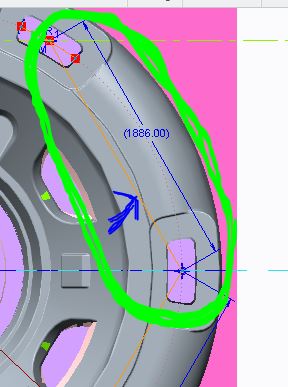

This thread is inactive and closed by the PTC Community Management Team. If you would like to provide a reply and re-open this thread, please notify the moderator and reference the thread. You may also use "Start a topic" button to ask a new question. Please be sure to include what version of the PTC product you are using so another community member knowledgeable about your version may be able to assist.

1 reply

18-Opal
May 25, 2016

Hi Deepak,

Unfortunately it is not currently possible to change the line thickness in Sketcher.  There is currently a Product Idea available for voting - Sketcher Line Font.  I would suggest voting on it.

Thanks,

Amit

1-Visitor
May 26, 2016

Refer to https://support.ptc.com/appserver/cs/view/solution.jsp?n=CS109233, this is an enhancement of Creo 4.0

21-Topaz II
May 26, 2016

That's a welcome enhancement, but what about changing the construction geometry to something other than the nearly invisible dot font (see the image above)?