
1-Visitor
June 9, 2017
Solved

How to change the arrow size in Creo 3.0?? and also the tail length of an arrow?

  • June 9, 2017
  • 3 replies
  • 15805 views

Is there anyway to set the specific arrow size and length for the whole drawing rather than selecting every arrow and changing its dimensions??


Regards,

Syed Ateeq
Best answer by AmitDeshpande

Hi Syed,

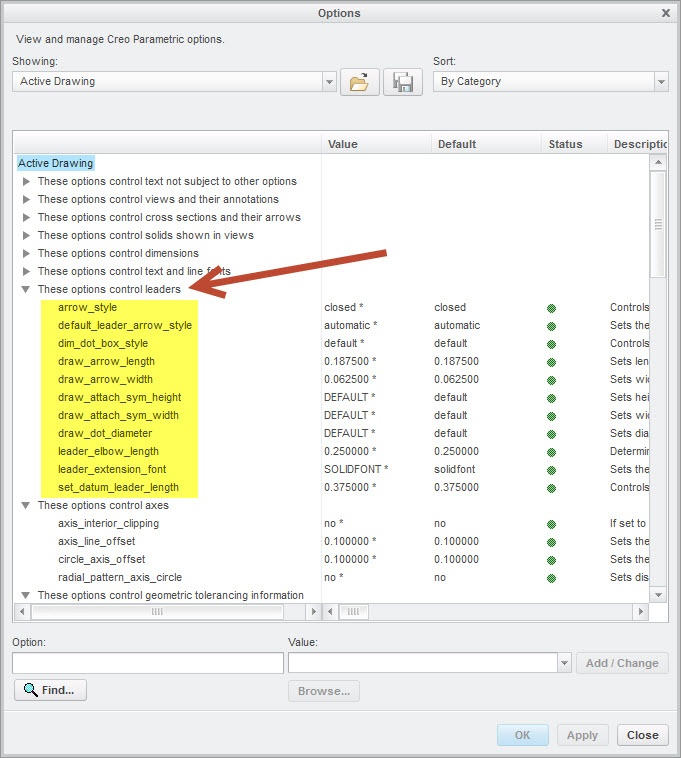
In the drawing, go to File > Prepare > Drawing Properties > Detail Options > change and try changing the following to see if that helps:

dtl_opts.jpg

Thanks,

Amit

3 replies

18-Opal
June 9, 2017

Hi Syed,

In the drawing, go to File > Prepare > Drawing Properties > Detail Options > change and try changing the following to see if that helps:

dtl_opts.jpg

Thanks,

Amit

sateeq1-VisitorAuthor
1-Visitor
June 10, 2017

Thanks a lot Amit. It works to change the size and length of the arrow head. But still i couldn't able to change the tail length of the arrow. Is there any option or tool to make the tail length shorter?? I have attached a screenshot below for reference.

Regards,

Syed

StephenW
23-Emerald III
June 10, 2017

Witness_line_delta