
kdirth
21-Topaz I
November 3, 2017
Question

How to control orientation of dimension in 4.0

  • November 3, 2017
  • 6 replies
  • 4779 views

I am trying to create a horizontal dimension to the silhouette curves af a part.  In 2.0 I would get prompted for dimension orientation.
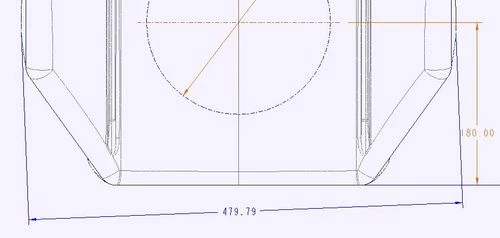
Capture.JPG

Is there a trick to create the needed dimension in 4.0?

6 replies

Mahesh_Sharma
22-Sapphire I
November 3, 2017

In Creo 4.0, Orientation will change per cursor placement. Try creating dimension and move cursor to get correct orientation. 

kdirth
kdirth21-Topaz IAuthor
21-Topaz I
November 3, 2017

I have tried that without success.  No mater where I move the curser, the dimension remains the same.  After placement, if I select the dimension, the orientation button in the ribbon is greyed out.


It is acting as though one of the silhouette curves is being treated as a straight line.  I have tried selecting on different areas of the curves with the same result.

There is always more to learn.
1-Visitor
November 9, 2017

when creating, just before you place it, right click and you have options to set it perp or par to an entity. Try that.