12-Amethyst
January 10, 2024
Solved

how to copy a part?

  • January 10, 2024
  • 2 replies
  • 4149 views

Hi all,


todays question: copying a part already in the assembly


remember, transitioning from Creo 3 to Creo 9..


I used to be able to select a part, then copy (CTRL+C) & paste (CRTL+V) it in the assembly..  I then  only need to pick the missing constraints for the new part..  (No need to go thru the whole 'browse for the desired part'..)


Now (Creo 9) While I can select the part, the copy function seem to only copy some surface..


What changed? Can this still be done?

 

Best answer by kdirth

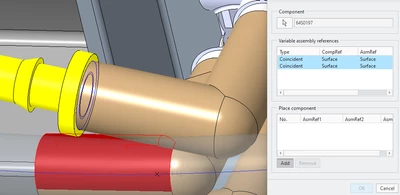
Select the constraints in the top box.  You can leave out any that will be the same in the new location.

Select Add.

Select new references.  Old references are highlighted for reference.

New part will populate and you can start placing another copy.

Select OK when done.

kdirth_0-1704916735962.png


2 replies

12-Amethyst
January 10, 2024

correction, I can do it, but not from a part within a pattern..


Delete pattern, select part, place, then pattern..

23-Emerald III
January 10, 2024

Select the part, use the repeat command.

12-Amethyst
January 10, 2024

thanks!


OK, found it..


I get the dialog box, but have no idea what to click or select to place said component..  I see the original part's constraints, but have no clue as to how to add the new constraints..  I have the add button, but doesn't seem to do anything.


(And another command that seem convoluted to use..)  


23-Emerald III
January 10, 2024

If you select the part and not just a surface, you can still up copy paste or paste special using the advance reference option.

12-Amethyst
January 10, 2024

thanks all, I think I got it!!