
1-Visitor
October 25, 2017
Question

How to correctly sweep through this curve?

  • October 25, 2017
  • 2 replies
  • 2658 views

Made this curve through points, it supposed to be a conveyor belt
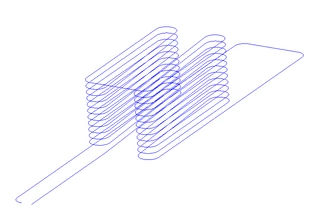
1.PNG

When i tried to make a simple sweep, drew a rectangle at the starting point, it swept it along the trajectory by rotating the rectangle, based on the curve's direction. So the rectanlge didn't remain normal , and I couldn't figure out which setting to use
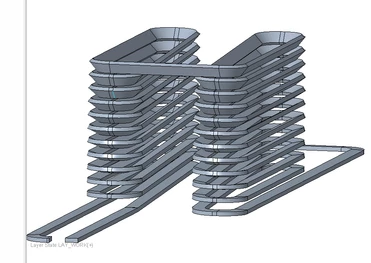
2.png


So the question, how can I make this sweep, so the rectangles sides stay normal to something, and doesnt rotate?


Or is there an alternative way to do this? I just want a rectangle section along the curve


Here's the file : files.fm/u/dpqvzrxw#


Thanks!!


2 replies

10-Marble
December 23, 2024

Hi, did you find any solution to this problem?

I know it's been 7 years, but I have a similar problem with control of my sweep and preventing an unexpected twist.

Screenshot 2024-12-23 004014.png

Van_AG
15-Moonstone
December 23, 2024

Set "Section plane control" to "Normal To Projection" in sweep References.

And set datum plane witch will define orientation for sweep section.

10-Marble
December 23, 2024

@Van_AG thank you , but can you please be more specific? I have about 25 planes in this design, I know you don't see them.

That rectangle must be rotated 90 deg, so the angle that now has 51.9155 deg should have 90 deg and the other one should have 0 deg.


I'm not sure which datum plane to pick as it doesn't generate anything when I do. It doesn't allow me to sketch the profile anything when I do.

Which planes to pick?Which planes to pick?

1 must be parallel to 2 and right angle between 3 & 4. The turn to bottom left must be flat as well, with the bigger surface on the top. 

Van_AG
15-Moonstone
December 23, 2024

Can you share the trajectory curve please.

I'll try to explain