12-Amethyst
March 3, 2024
Solved

How to create a centerline at a certain distance from another centerline ?

  • March 3, 2024
  • 1 reply
  • 2897 views

Hi,

In a sketch, I draw a first datum centerline. Then I want to draw another centerline at a certain distance from the first centerline. My problem is that when creating the second centerline, CREO seems to select the nearest geometry edge to specify a distance. How to specify the first centerline as the reference for the second centerline ?

Thank you for any help

Best answer by tbraxton

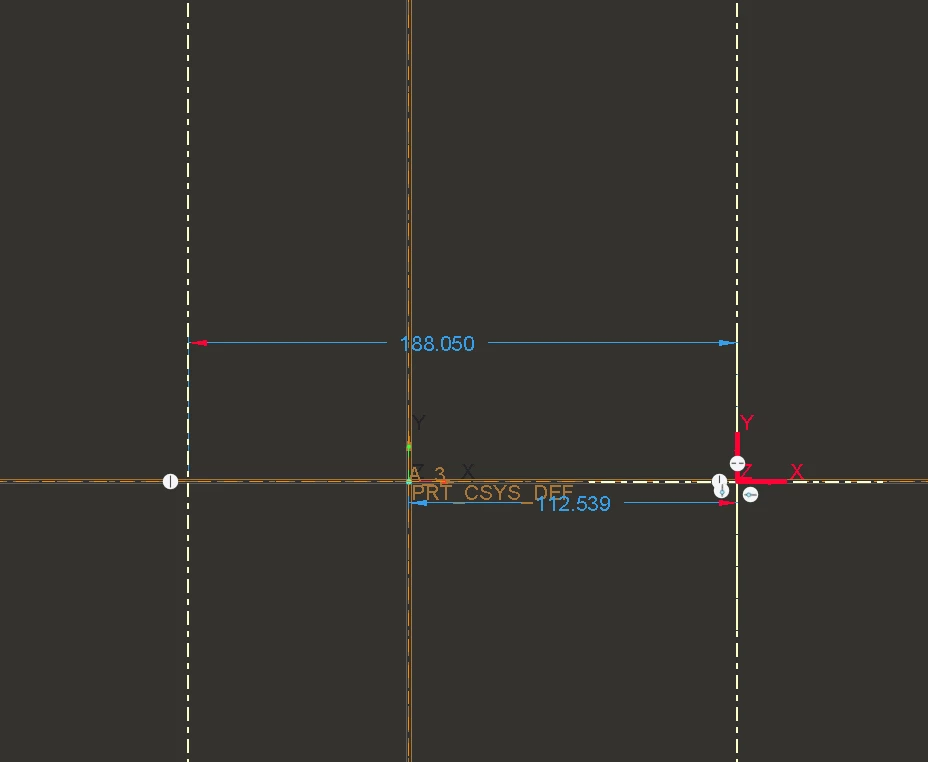
One option to do this all within the sketch is to drop a sketcher coordinate system in the sketch before creating the centerlines. Create the first centerline coincident with this csys and then add the second centerline.


tbraxton_0-1709490318384.png


1 reply

tbraxton
22-Sapphire II
tbraxton22-Sapphire IIAnswer
22-Sapphire II
March 3, 2024

One option to do this all within the sketch is to drop a sketcher coordinate system in the sketch before creating the centerlines. Create the first centerline coincident with this csys and then add the second centerline.


tbraxton_0-1709490318384.png


YHAdesign12-AmethystAuthor
12-Amethyst
March 3, 2024

Thanks a lot tbraxton, this helps definitely in my case. However, it is strange that there is no feature that would take any existing centerline as a reference for subsequent centerlines ?

tbraxton
22-Sapphire II
22-Sapphire II
March 3, 2024

It is an issue with how Creo uses references for the intent manager to create dimensions in the sketch. I am not aware of a way to select a sketched centerline as a sketch reference within the sketcher. This type of scenario is addressed through the use of sketcher constraints and sketcher construction entities.


Overview

Construction geometries are signified by dotted, magenta entities within Sketcher. Construction geometries are important because you can use them to constrain your sketch easily. With construction geometries, you can control design intent, simplify dimension schemes, and simplify sketches. To create new construction geometry in Sketcher, you can toggle Construction Mode on, and then you can use any sketch tool available to sketch new geometry. However, the resulting geometry is created as construction geometry rather than solid geometry. Once done, you can then toggle off Construction Mode and resume sketching solid geometry using the same sketch tools. You can dimension and constrain construction geometry in the same manner as regular solid geometry. Construction geometries do not add entities to the final sketch, and therefore they do not display in the final Sketch feature. You can convert any solid geometry to construction geometry and vice versa. To do so, select the geometry entity you wish to convert and click Toggle Construction from the mini toolbar.