4-Participant
December 24, 2024
Solved

How to cut a pipe at intersection

  • December 24, 2024
  • 1 reply
  • 703 views

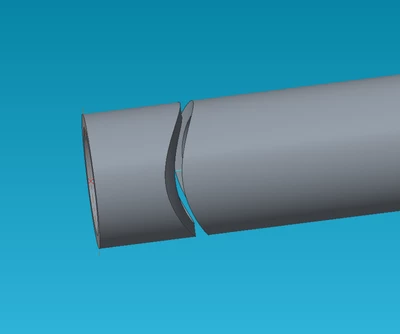
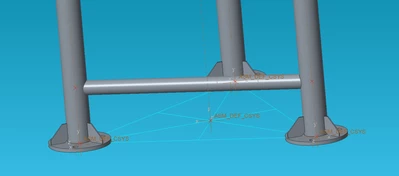
Hi, I am new to creo so this question might be dumb, but i can't figure it out how to cut a pipe when it intersects other pipe(i attached a photo).  As you can see in the picture i have a horizontal pipe that i want to cut at the face of the vertical pipe. I tried to use component operations (I have CREO 3) but when i am using this command it cuts just the intersection(see pic 2).Could you help me to do this cut?

Thanks!
GV_11208110_0-1735034844476.png    


GV_11208110_1-1735034986808.png


Best answer by Van_AG

There is different ways...
For example
- activate the horizontal pipe component
- select 'Geometry' in Object filter
- select outside cylindrical surface of the vertical pipe
- press <Ctrl+C> <Ctrl+V> Ok
- select the quilt (or the 'Copy 1' feature in the horizontal pipe Model Tree)
- select Solidify command and 'Remove material' in the command options

- press Ok

- press <Ctrl+A> to activate the top assembly

1 reply

Van_AG
Van_AG15-MoonstoneAnswer
15-Moonstone
December 24, 2024

There is different ways...
For example
- activate the horizontal pipe component
- select 'Geometry' in Object filter
- select outside cylindrical surface of the vertical pipe
- press <Ctrl+C> <Ctrl+V> Ok
- select the quilt (or the 'Copy 1' feature in the horizontal pipe Model Tree)
- select Solidify command and 'Remove material' in the command options

- press Ok

- press <Ctrl+A> to activate the top assembly