1-Visitor
May 13, 2022
Solved

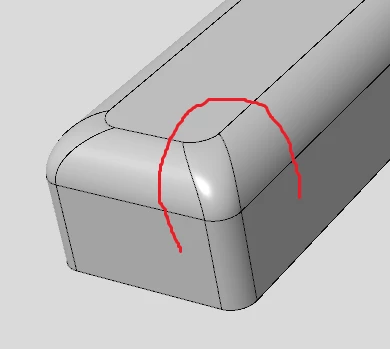
How to draw a freehand curve fitting the surface of the model?

  • May 13, 2022
  • 1 reply
  • 2278 views

■Q6:How to draw a freehand curve fitting the surface of the model?

The command under the"Style/curve/COS" only can draw on a single surface, it can not across adjacent surfaces.

Walker_0-1652455359716.png


Best answer by tbraxton

See the enclosed part for reference on how to create your curve on surface.


The tool you are attempting to use is restricted to a domain of 1 unique surface. The issue is due to how surfaces are handled in the geometry kernel. Even though you have created a quilt by copying the solid surfaces, each surface patch has a unique internal feature id. When you are attempting to create a curve on surface only surfaces can be selected, not quilts.


You can create curves on surface and connect them across the surfaces to maintain continuity. If you use multiple on surface curves and connect them it will work.


The curve on surface within style is by design tailored to work with surfaces created in style. Style features are super features that behave differently than core Creo features.  While they work with core Creo features they were integrated into Creo from a separate software product that was created as a surface modeler. This is why I used a style drop curve in my previous example. The curve used to drop can be planar or a 3D curve.

1 reply

tbraxton
22-Sapphire II
22-Sapphire II
May 13, 2022

Create a quilt using surface copy of the solid surfs of your model. You should then be able to drop COS in style on the quilt. Red is a style curve; blue is this curve dropped on quilt using COS.


Example geometry and model tree shown here:

tbraxton_0-1652457311197.png


Walker1-VisitorAuthor
1-Visitor
May 14, 2022

my model tree is the same as yours . But I can't draw a curve across multiple adjacent surfaces directly, if I want to get a similar effect, I must draw my curve onto some flat plane first and then project it onto target surfaces

Walker1-VisitorAuthor
1-Visitor
May 14, 2022

ss.png

Here is the screen shot, my model tree is the same as yours, but I can't do that

