
1-Visitor
July 5, 2014
Solved

How to erase specific edges on drawing file.

  • July 5, 2014
  • 3 replies
  • 5847 views

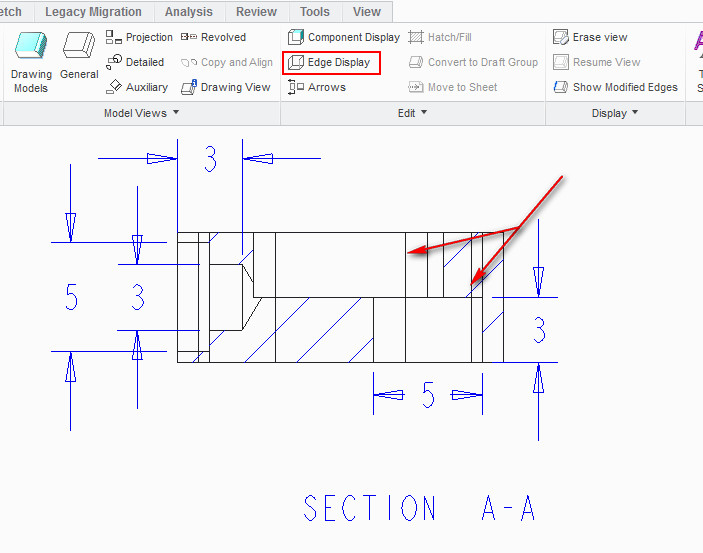
I want to remove specific edges in the drawing file on a section view but not able to do so.
1.jpg

I tried Edge Display Tool but it is not working. How it is possibe please help me in this regard.


Regards

Nisheeth.


This thread is inactive and closed by the PTC Community Management Team. If you would like to provide a reply and re-open this thread, please notify the moderator and reference the thread. You may also use "Start a topic" button to ask a new question. Please be sure to include what version of the PTC product you are using so another community member knowledgeable about your version may be able to assist.
Best answer by bduncan

QQ%E5%9B%BE%E7%89%8720140705155222.jpgI think you should check it here

3 replies

17-Peridot
July 5, 2014

share the model...

17-Peridot
July 5, 2014

Those are probably not edges. Section A-A must be a offset section. These are the division lines for where the offset jogs. I haven't found a way to control these.

1-Visitor
July 5, 2014

When I Select from pick from the list it says Surface F12 Extrude 4. Check the image.

It means we can not use Edge Display command to clean any specific line, so for what it is meant for.

2.jpg

In Autodesk Inventor any line can be selected and turned off its visiblity on the right click context menu and change of colour as well. I was trying to find similar function.

17-Peridot
July 5, 2014

QQ%E5%9B%BE%E7%89%8720140705153428.jpg

bduncan17-PeridotAnswer
17-Peridot
July 5, 2014

QQ%E5%9B%BE%E7%89%8720140705155222.jpgI think you should check it here

1-Visitor
July 5, 2014

Thanks a lot quite a useful response, I was able to follow it easily. One more question I want to ask which tool is used to place centre mark and centre line representation in drawing sheet as you have showen in your image.

17-Peridot
July 5, 2014

QQ%E5%9B%BE%E7%89%8720140705223259.jpgIt seems that you are not familiar with creo drawing.I can tell you anything that I know(Creo)