
15-Moonstone
February 20, 2024
Solved

How to get Creo Parametric Cabling wires to show correct thickness in assembly from spools?

  • February 20, 2024
  • 1 reply
  • 2151 views

Hi,

I have an assembly where the Creo Parametric Cabling wires are no longer showing the correct thickness that's specified in the spools that are assigned to the harness. I have made sure that the thick cables option turned on for display setting and not center lines.

As I open the assembly in Creo it initially looks like this (should be black as last saved and stay this large size)

danders238_0-1708442074187.png

Then when the assembly finishes opening in Creo it looks like this with thicken display on

danders238_1-1708442132708.png

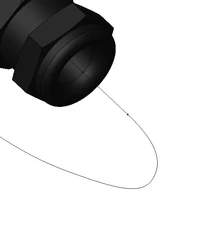
This is what it looks like when center line display setting turned on
danders238_2-1708442240216.png

The diameter of the insulation in the spool table set to 0.201 inches diameter and its showing up in the assembly like 0.01" diameter.


Any ideas on how to get the wires to show proper size from the spool tables for the harness?

Thanks for any help you may provide,

Don A

Creo Parametric 8.0.5.0


Best answer by danders238

The issue I was having was due to a higher level assembly not being in session due to there being routing references to that assembly.

Once the upper level assembly in session the wires display correctly for the sub assembly.

This lower level assembly has a multi conductor cable assembled on one end and then later the other end of the cable gets hooked up to a higher level assembly.

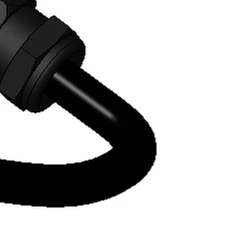
This is what it should normally look like.

danders238_0-1708445680959.png

Thanks,

Don A

1 reply

danders23815-MoonstoneAuthorAnswer
15-Moonstone
February 20, 2024

The issue I was having was due to a higher level assembly not being in session due to there being routing references to that assembly.

Once the upper level assembly in session the wires display correctly for the sub assembly.

This lower level assembly has a multi conductor cable assembled on one end and then later the other end of the cable gets hooked up to a higher level assembly.

This is what it should normally look like.

danders238_0-1708445680959.png

Thanks,

Don A