1-Visitor
June 20, 2018
Question

HOW TO HIDE THE REGENERATION STATUS BOX?

  • June 20, 2018
  • 2 replies
  • 4991 views

Hello Expert's


Is there any config options to hide the regeneration status box. which appears if model regeneration failed.

Please see the image give below.
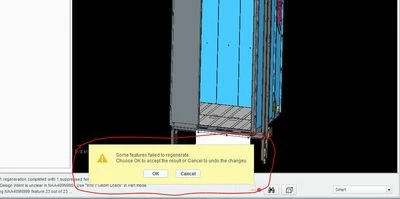
error.JPG


With Regards

Aghil.M

2 replies

HamsterNL
18-Opal
June 20, 2018

So...when dealing with "cause and effect", you want to focus on the effect?


If I were you, I would spend some more time and fix the cause...


In other words, you should fix the errors in your design, not hide the regeneration status box which shows that you have a problem with your design.

21-Topaz II
June 20, 2018

I understand your point, however there are many times where I make a change that I know will cause failures and being able to bypass this dialog would be helpful in those cases.  However, in most cases, the user needs to know that they've broken something and it needs to be fixed.

 
HamsterNL
18-Opal
June 20, 2018

@dgschaefer wrote:

...there are many times where I make a change that I know will cause failures...


Don't get me started Smiley LOL Smiley LOL Smiley LOL

23-Emerald III
June 20, 2018

Maybe what PTC needs to implement is a button in that box that will hide it for the rest of that session of Creo. You get the warning once, so you know there is an error, but after that you turn it off as you continue your build. There should also be a button in the options menu to turn the error message box back on within your session.

I agree with Hamster, fix the cause not the effect, but Doug's point about doing something that causes an error on purpose does have some merit. However, creating an error on purpose is the exception, not the rule that triggers the warning box.
