
12-Amethyst
May 21, 2025
Solved

How to inject a System of Units into a bunch of existing parts?

  • May 21, 2025
  • 2 replies
  • 1064 views

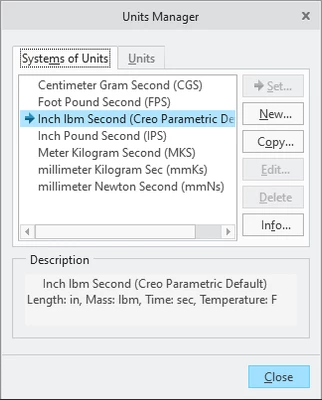
Is there a good way to inject a new System of Units into an existing part?  existing assembly?  Customer requested a change in reporting which requires different units, but I have maybe a couple hundred parts and assemblies to do.  Mapkey is not super consistent, so wondering if there is a good way to import?

Creo 9.  Am I missing something on the dialog box?
units-manager.png

Best answer by BR_14082907

Take a look at how to prepare the trail file:

It is a relatively easy process: in Notepad++, open a trial file of your current session, then in Creo, do what you have to do, return to the trial file, copy what was added to that file, and paste it into a new text file with the obligatory header.


Good luck!


2 replies

1-Visitor
May 23, 2025

Hi,


I would use mapkey that runs a trail file that executes your procedure.
The next step would be running it in a distributed batch.


Cheers!

ByDesign12-AmethystAuthor
12-Amethyst
May 23, 2025

Thank you.  That is an interesting idea I will have to look into.  I have run trail files, but not as part of a process.  Do you edit the trail file to include only the bits you need?

KenFarley
21-Topaz II
May 24, 2025

I've done this type of thing before, too. The basic method is to:

(1) Start a fresh Creo session- this will start a new trail file wherever you have them being written.

(2) Execute the commands to do one complete sequence of the task you want to repeat. Load file in, run stuff on it, save altered file, etc.

(3) Close the file you opened. This is important so you don't run up against the limit on the number of files that can be open at one time, whatever that is.

(4) Exit Creo, which ends the current trail file.

(5) Copy the trail file (the one with the largest extension, like trail.txt.444 or whatever. Copy it to another file with the .txt extension.

(6) Edit the trail file, copying and pasting the sequence of commands as many times as you need for all the files.

(6) Replace the file name for each consecutive group of commands with each file name you want to process.


Once the trail file is done, you can start Creo and load the trail file to run it.

It's best to try out the trail file on a single file, copied from one of your original ones, to make sure you're not making any errors that could damage your data.


If you look about on these forums, you'll find past discussions of this that give other ideas on how to utilize this method.

tbraxton
22-Sapphire II
22-Sapphire II
May 23, 2025

Are you aware that you can save analysis features which can be reported in a unit system different from that assigned to the model? This may let you generate the data needed without changing the unit system of a model. What needs to be reported in the alternate units? If this is something common across the models, then it may be more easily "automated" with the addition of analysis features or saved analyses.

ByDesign12-AmethystAuthor
12-Amethyst
May 23, 2025

No, I did not know that.  Always more to learn.  I will have to look into this.  Thank you.