
1-Visitor
October 16, 2014
Question

How to make color parameters reflect on wires in Cabling

  • October 16, 2014
  • 3 replies
  • 2030 views

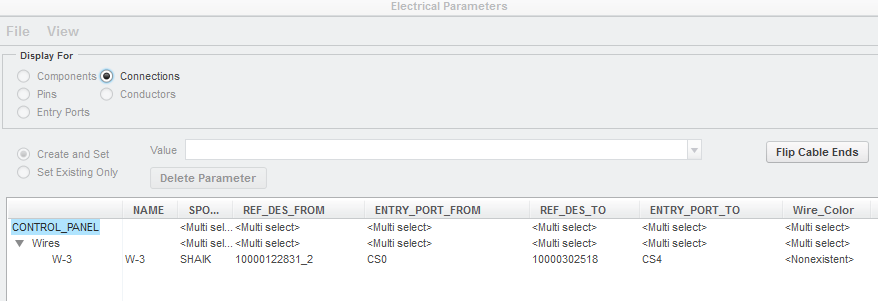
I have added a parameter naming Wire_Color in the Parameter window of Cabling as below.

My problem is I don't know how to enter different colors in parameter window so that I can change different colors in this window itself.
Capture.PNG


This thread is inactive and closed by the PTC Community Management Team. If you would like to provide a reply and re-open this thread, please notify the moderator and reference the thread. You may also use "Start a topic" button to ask a new question. Please be sure to include what version of the PTC product you are using so another community member knowledgeable about your version may be able to assist.

3 replies

13-Aquamarine
October 16, 2014

Hi Syed...

The parameter Wire_Color you've defined will be seen as a "user-defined" parameter. This means it is not one of the standard parameters supported by Creo cabling. The system will see this parameter as one you've "invented" yourself.

This is certainly okay. But I guess I'm wondering if you're just trying to enter information into this custom parameter using the Electrical Properties tool, or if you're trying to have Creo cabling automatically color the wires as they're routed. There's a difference. If you want Creo to automatically color the wires, you'd use the Color parameter (which is a standard parameter) rather than Wire_Color which the system will see as user-defined parameter.

Please let us know what you're trying to do and I'm sure we can help you.

Thanks!

-Brian

catipash1-VisitorAuthor
1-Visitor
October 16, 2014

Hi Brian,

I want Creo to automatically color the wires as I route how do i do that?

Thanks

Syed

2-Explorer
October 20, 2014

As Brian wrote: Use the parameter COLOR to define the wire/cable colors.

Things to note:

  • The parameter is a spool parameter, not a wire parameter
  • You need to have an appearance defined with the very same name
  • Don't use upper case letters for the appearances' names in the gallery