1-Visitor
April 28, 2022
Solved

How to make imported part show solid lines in a drawing section

  • April 28, 2022
  • 4 replies
  • 7358 views

I am using Creo Parametric 7.0 and am making a drawing and one of the parts in the assembly has been imported from a .step file. When I take a section of the assembly, the imported part instead of showing just solid lines, shows all of the quilt lines in magenta and purple. So essentially, you are seeing through the part, no longer just the nearest surfaces to the section plane. I have found some threads about using the import data doctor and have tried to make it a solid part, but have had no luck.


Is there a way to fix this in the drawing itself, or does it need to be done in the part? 


The first picture is what it looks like when I take a section, the second picture is what it looks like when I dont take a section (what it should look like).
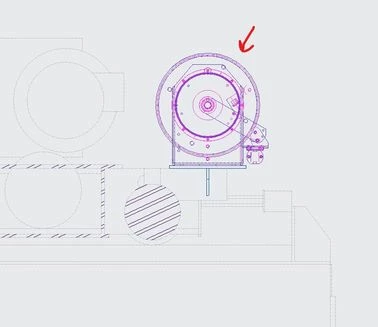
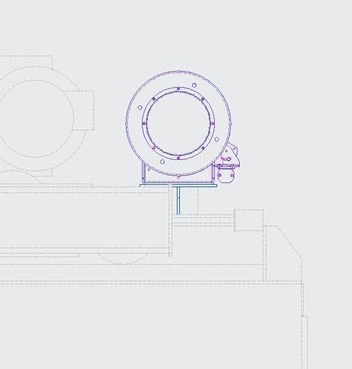
 

creo_help.jpg


creao_help_2.jpg

Best answer by tbraxton

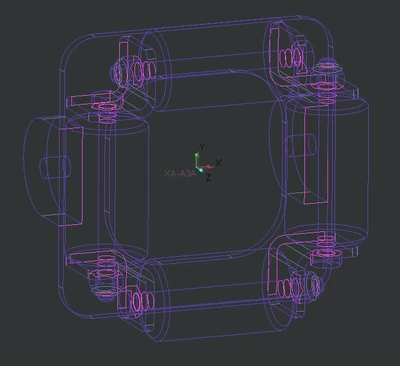
You are correct that your import geometry has non manifold quilts which is why it is not being solidified. The geometry is trivial (cylinders and prismatic rectangles) and the errors are almost certainly caused by the method used to export it.


It can be fixed with IDD but you should try exporting the assembly source file as an assembly in STEP format. Import it as an assembly in Creo. That may resolve the issue.


Every magenta edge you see in this image is open.

tbraxton_0-1651590513326.png


4 replies

KenFarley
21-Topaz II
April 29, 2022

It's likely that your imported STEP file is not an actual manifold solid in Creo. If there is bad geometry in the file, things like intersecting surfaces, etc. then a solid is not created and the result is just a bunch of surfaces. Thus your troubles with making a section cut.

1-Visitor
April 29, 2022

How would you go about fixing this? The step files are coming from a vendor. Is there options to change when importing it that will create a solid part?

tbraxton
22-Sapphire II
22-Sapphire II
April 29, 2022

There are some settings that can be used to improve translation but you would need to know the export filters in the originating CAD system to employ them effectively. One item to check is accuracy in Creo, it should match the resolution of the STEP export. Absolute accuracy in Creo has units of length and you will need to manually set that up in Creo on your end. 


Confirm with the source that they are exporting a solid STEP model and that when they bring this STEP back into their CAD tool it is indeed solid.


The STEP standard used can also have influence on success.

http://support.ptc.com/help/creo/creo_pma/usascii/index.html#page/data_exchange%2Finterface%2FSupported_STEP_AP203_and_AP214_Classes.html%23wwconnect_header 


Import data doctor tools are useful but using them can be incredibly tedious and time consuming and requires some knowledge of how manifold surfaces "work". 


Before you do any of this I would try opening the STEP model in Solid Works or another CAD program. If it opens as a solid model in the other CAD program then you can export that and bring it in to Creo. SW often will import as a solid when Creo does not. Creo can open SW files so you would not necessarily need to export it in a neutral format.


23-Emerald III
April 29, 2022

This is a cross section "thing" when a model has surfaces (quilts).

In the model, edit definition of the cross section, go to the models tab and check the box for Include Quilts


Also, vote for the improvement to add a config.pro option so a user can set it so this box would be checked by default

https://community.ptc.com/t5/Creo-Parametric-Ideas/Config-pro-option-for-Include-Quilts-option-while-creating-cross/idi-p/697199

1-Visitor
April 29, 2022

The problem with this is that I need the part to show in the section view. If i check that box the entire part disappears. I need it to show up, but as a solid body.

23-Emerald III
April 29, 2022

The part should not disappear completely but should x-section with the correct hidden lines. Of course with a surface model, there will be no section lines since there is no solid geometry.

You may also have to go to the view properties, View display and check YES for hidden line removal for quilts.


Your best option is to get the model as a solid but you may be able to work-around the issue if you can't do that.

23-Emerald III
April 29, 2022

Also, sharing the model and drawing (simplified) if possible would help us get you to the quickest solution.

1-Visitor
May 3, 2022

I think I have narrowed it down to the .step & .iges files that we are using to create parts are having issues with the quilts and having open surfaces and will not coming in as solid parts. I was able to get some of the parts to solidify, but some have open features and are not working. I have tried to repair them with no luck. Attached is a file of an example. Is anyone able to make the entire part solid? I can make certain parts of it solid, but am not having luck making the entire part solid. I have tried a few things in the IDD but am not too familiar with it and didn't have any luck.

tbraxton
22-Sapphire II
tbraxton22-Sapphire IIAnswer
22-Sapphire II
May 3, 2022

You are correct that your import geometry has non manifold quilts which is why it is not being solidified. The geometry is trivial (cylinders and prismatic rectangles) and the errors are almost certainly caused by the method used to export it.


It can be fixed with IDD but you should try exporting the assembly source file as an assembly in STEP format. Import it as an assembly in Creo. That may resolve the issue.


Every magenta edge you see in this image is open.

tbraxton_0-1651590513326.png


Patriot_1776
22-Sapphire II
May 3, 2022

As mentioned, you have imported a surface model that is not "closed" into a solid.  You can fix it manually, which can be EXTREMELY tedious and pretty much impossible if you're not fluent in surfacing, or, you can try my personal cheat:  If you have Solidworks, import the file into Solidworks, run the diagnostic and fix it there and if SW fixes it as a solid, then make a new STEP file and import it into Creo.  Since I have both (but only use SW for fixing these files), I've been able to save a TON of time over the years doing this.  SW has a MUCH better "fixer" than Creo, sadly...  If you can, I'd try that first.


Best of luck!

23-Emerald IV
May 3, 2022

Yep, I'm doing the same thing.  Even Creo models that contain geometry checks and export poorly can be brought into Solidworks, automatically fixed, and re-exported.

Patriot_1776
22-Sapphire II
May 3, 2022

I tell ya, that's the easiest way I've found.  It's amazing the garbage SW will fix.  It's not good for anything else, but it's good for that!  LOL  Creo needs to step up their game on this area....among many others.