
1-Visitor
February 20, 2014
Solved

How to make Springs end Flat?

  • February 20, 2014
  • 7 replies
  • 12121 views

How do you make a springs end flat when using helical sweep?kl.jpg
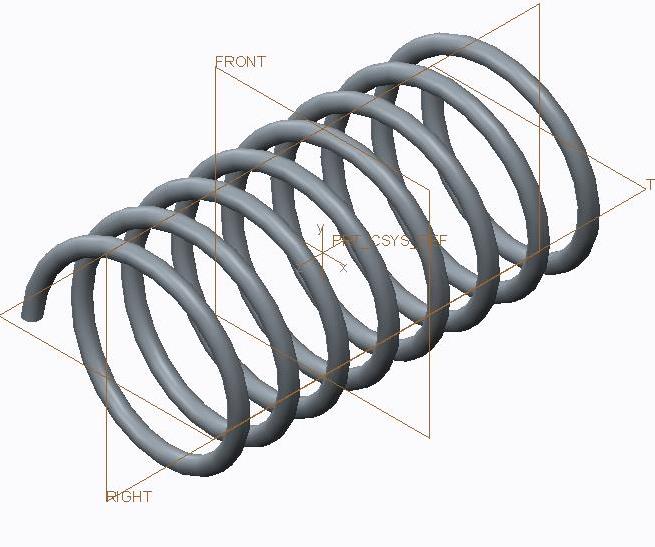

This thread is inactive and closed by the PTC Community Management Team. If you would like to provide a reply and re-open this thread, please notify the moderator and reference the thread. You may also use "Start a topic" button to ask a new question. Please be sure to include what version of the PTC product you are using so another community member knowledgeable about your version may be able to assist.
Best answer by TomD.inPDX

s.iyer wrote:

To make the ends Sqared and Ground, use the "Wrap" command.

Closed and Ground Spring - Alternative to Helical Sweep

7 replies

16-Pearl
February 20, 2014

You simply have to make an extrude at each end along your top plane to cut the spring at the dimension you want.

1-Visitor
February 20, 2014

I prefer to build springs using sweep along a datum curve, the datum curve based on equations, and the equations driven by graphs. It makes it easy to build closed end springs. http://communities.ptc.com/docs/DOC-3063

Be aware that wound springs with fixed ends change diameter as they expand and compress. If the ends can rotate they change the number of turns; both of these are to maintain the overall wirelength of the spring.

1-Visitor
February 20, 2014

I prefer to do springs the way David mentions above. You can then change the pitch however you like. If you are referring to grounded then ends my preferred way is to do a solidify on a datum plane that represents the flat surface of the ground. Usually you already have one datum plane where you want, then it's just a matter of creating another through the other end of the curve, offset from the first.

1-Visitor
February 20, 2014

If you must stay with a helical sweep then just click on the pitch tab after creating your sweep profile and add points via dimensions from the start of the sweep, ratio, or via references. Depending on how you want the pitch to vary, you may have to add several points. Then change the pitch values as desired. Creo 2.0.

1-Visitor
February 21, 2014

To make the ends Sqared and Ground, use the "Wrap" command.

17-Peridot
February 21, 2014

s.iyer wrote:

To make the ends Sqared and Ground, use the "Wrap" command.

Closed and Ground Spring - Alternative to Helical Sweep

Patriot_1776
22-Sapphire II
February 21, 2014

Depending on exactly what you want to do, you can do as David suggested and use graphs. You can change pitch, radius, and direction (2 reverses). I did this one in 2007:

CURVE-01.JPG

Or, you can wrap the spring easier if the diameter is constant (cylindrical). I did this one in 1999:

Copy+of+COILSPRING-01.JPG

Or this as a wrap with closed and ground (flat as you called them) ends. There is a dead coil at each end per spec, tangent contact and nice transitions. It's also extremely robust. I did this one in 2013:

CLOSED-N-GROUND_COMP_SPRING_G.JPG

It's all great lessons in advanced geometry. Have fun!

Patriot_1776
22-Sapphire II
February 25, 2014

Ahh, more "spring" fun......

SPHERICAL_CURVE_TEST-01.jpg

17-Peridot
February 26, 2014

I thought that only happens when the universe explodes ...again.

Patriot_1776
22-Sapphire II
February 26, 2014

....sorry, I divided by zero again........