
1-Visitor
November 24, 2010
Solved

How to measure total surface area?

  • November 24, 2010
  • 2 replies
  • 21793 views

Hello All,

I found difficulty in measuring total surface area of modeling part. I just able to measure a single selected surface but can't for totally one. See this following picture for detail?

Does anyone able to solve this case?

Thanks
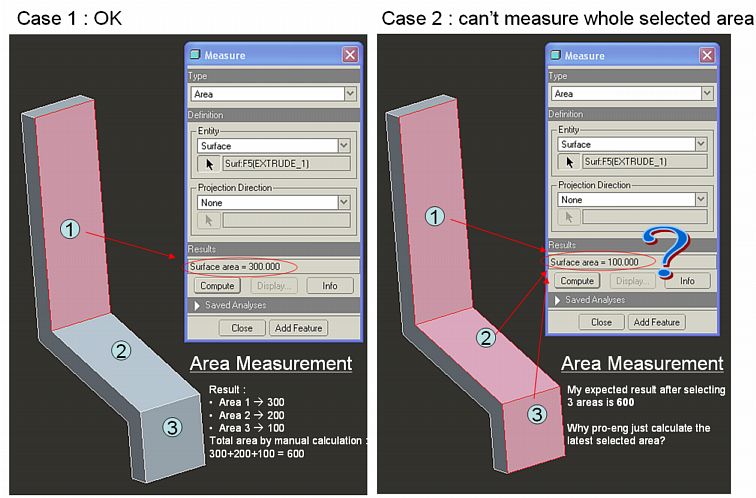
area measurement.jpg

Best answer by MGortner

Alternatively, you could create a copy of the surfaces you want included in the area calculation and then select the quilt.

2 replies

24-Ruby III
November 24, 2010

Sandy,

when you select object to measure, place cursor on your model, click right mouse button and use Pick From List command. In Pick From List window select name of you part and click OK.

Martin

1-Visitor
November 25, 2010

Thanks Martin,

I've tried but it not works. In pick of list menu, I can't select more than one surface that I've to measured. I don't know, might be what I've done is not like your suggest.

Btw.. thanks Martin

24-Ruby III
November 25, 2010

Sandy,

just to explain... I apologize, my suggestion was wrong, because I did not read your question carefully. I thought that you want to measure the surface of whole part.

Martin

MGortner1-VisitorAnswer
1-Visitor
November 24, 2010

Alternatively, you could create a copy of the surfaces you want included in the area calculation and then select the quilt.

1-Visitor
November 25, 2010

You've solve my case Mat.

Even though I have to make a copy surface first, but it can totally measure all surfaces.

Thanks Bro!

Need your advice for another case may be next

How to Measure Multiple Surface Area

1. Use 'copy' surface and select multiple surface area which want to measure

2. Click 'Measure' icon

3. Choose 'area' for type & 'quilt' for entity

4. Select 'copy surface' for quilt entity

5. Pro-E will measure the surfaces, shown on Results row --> quilt area = ...

Thank you

solve.jpg