
1-Visitor
June 21, 2014
Solved

How to rotate features on side of rectangular part

  • June 21, 2014
  • 1 reply
  • 1107 views

I have a few features located on one side of a rectangular part. I need to duplicate these features on each side of the rectangle. If the part was square I would pattern the features about the center axis. But I'm having difficulties figuring out how to do it on a rectangle.


This thread is inactive and closed by the PTC Community Management Team. If you would like to provide a reply and re-open this thread, please notify the moderator and reference the thread. You may also use "Start a topic" button to ask a new question. Please be sure to include what version of the PTC product you are using so another community member knowledgeable about your version may be able to assist.
Best answer by DavorGranic

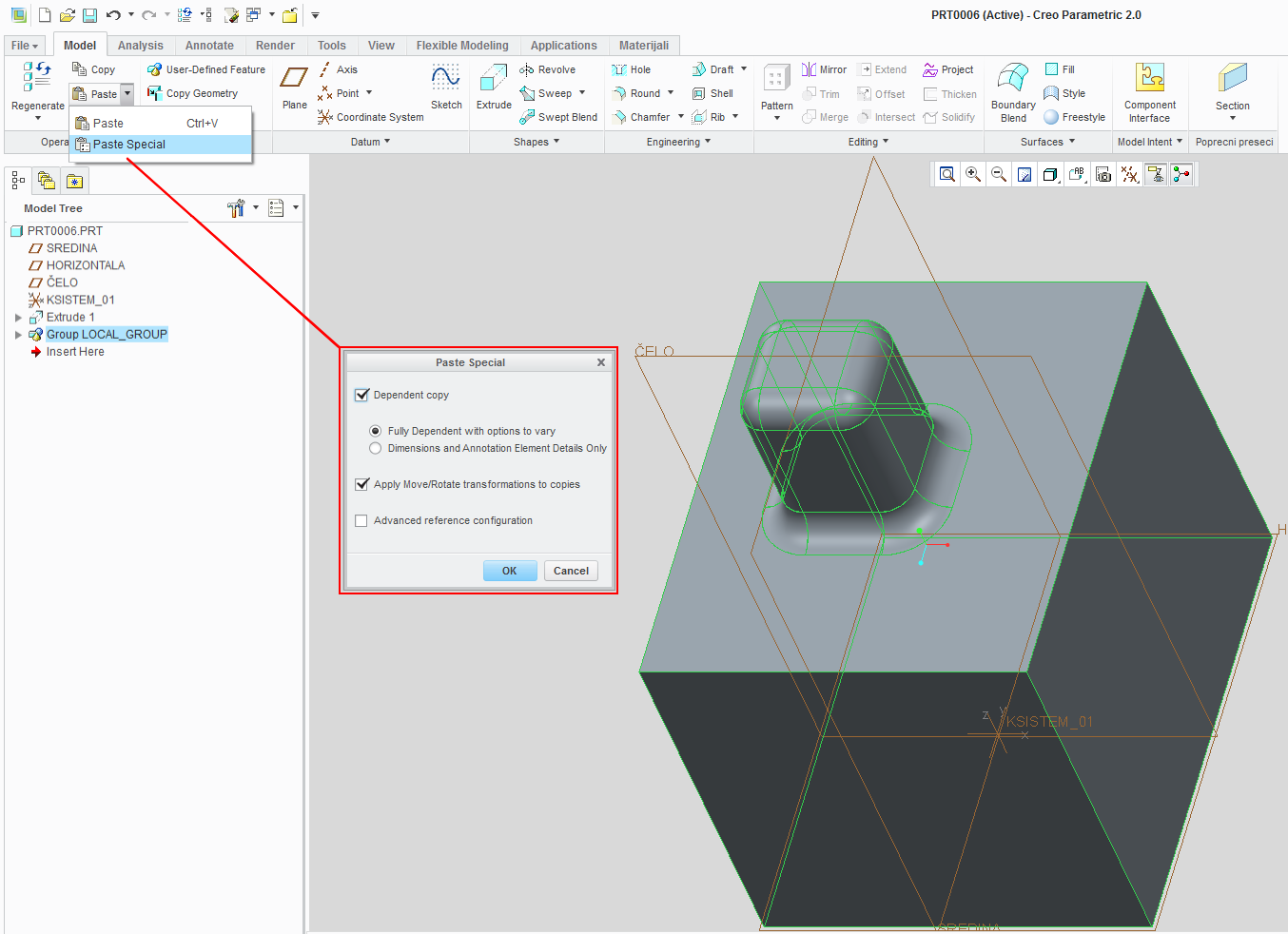
What you need to use is copy/paste special.

Group your features you want to "move" copy them and use paste special command. This way you can make dependent copies also.

You may wana use "advanced reference configuration" and give new references to placement then edit positioning dimensions to place more precisely.

1.png

1 reply

16-Pearl
June 21, 2014

What you need to use is copy/paste special.

Group your features you want to "move" copy them and use paste special command. This way you can make dependent copies also.

You may wana use "advanced reference configuration" and give new references to placement then edit positioning dimensions to place more precisely.

1.png