
1-Visitor
February 21, 2014
Solved

How to rotate part about center of face

  • February 21, 2014
  • 7 replies
  • 4664 views

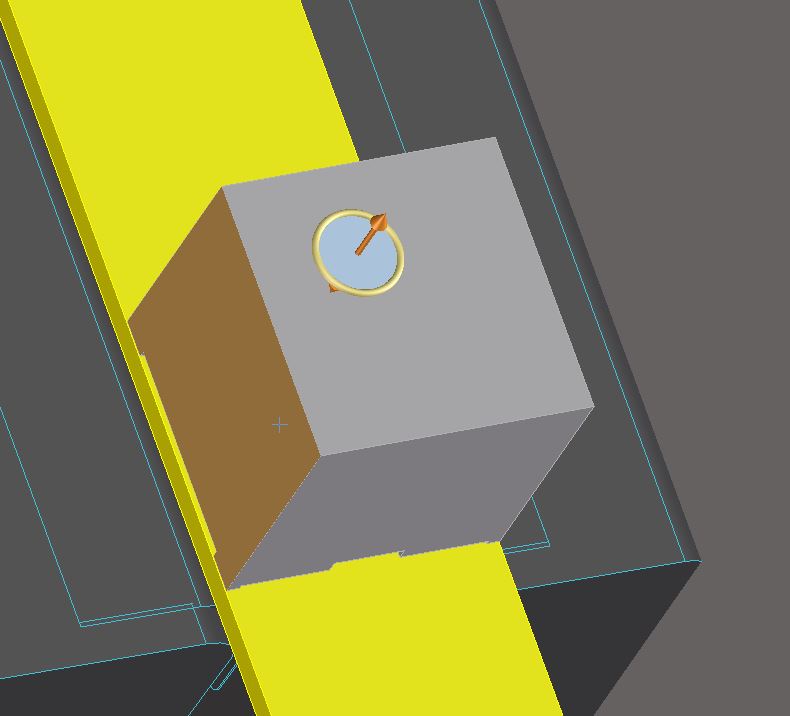
Hello, I would like to rotate a part about the center of one of its faces. I am having trouple with this. See attached image. I am not able to 'snap' to the center of the face. I also cannot figure out how to use the midpoints of the edges of the face as as guides for the axis of rotation. Any help would be appreciated.
Capture.JPG

Thanks,

Marcus

P.S. I am using Creo Elements/Direct Modeling Express (x64 edition) Revision: 4.0

Message was edited by: Marcus Garfunkel, Added Version info


This thread is inactive and closed by the PTC Community Management Team. If you would like to provide a reply and re-open this thread, please notify the moderator and reference the thread. You may also use "Start a topic" button to ask a new question. Please be sure to include what version of the PTC product you are using so another community member knowledgeable about your version may be able to assist.
Best answer by GaryLinscheid

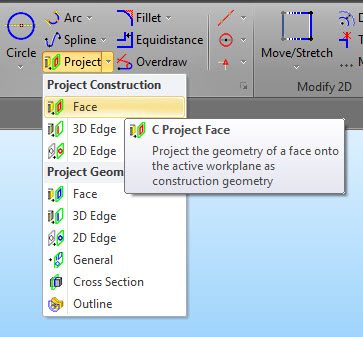
You missed the step of projecting the face edges onto the workplane.

2014-03-20_10-09-47.jpg

7 replies

Dale_Rosema
23-Emerald IV
February 21, 2014

Is the face that you are talking about the light blue circular face or the face of the square block? If it is the block, can you make plane from diagonal corners and the make an axis from the intersection of the plane and use that for the rotation axis.

If it is the circle is there something that will allow you to put a perpendicular axis through the surface centered on the circle.

Thanks, Dale

1-Visitor
February 21, 2014

Dear Dale,

The face that I am talking about is of the square block. That circular face was the result of me dynamically rotating the face of the square block. Athough it causes the rotational axis to be the random point I click instead of the exact center, which I desire.

See image attached, those are the create workplane choices I have. Which one do I use to select the plane from diagonal corners?

Untitled.png

Thanks,

Marcus

1-Visitor
March 20, 2014

Due to lack of interest, I will conclude that there is no possible way to rotate an object about the center of a face. This is unfortunate for me, but I appreciate the help that was offered.

Thanks,

Marcus

15-Moonstone
March 20, 2014

You have to have something to define the rotation axis. In my example, put a workplane on the face, project the face edges and create a line between the corners. Put a circle at the center of the diagonal line and use the circle to define you rotation.

2014-03-20_9-44-10.jpg

1-Visitor
March 20, 2014

Dear Gary,

Thanks for this information. I have created the workplane on the face and made an attempt to create a diagonal line from the opposite corners, but there does not seem to be any snapping action even though I have the 2D copilot settings correct.

2D+Snap.png

How were you able to create the diagonal line across the face by referencing the corners?

Thanks,

Marcus

15-Moonstone
March 20, 2014

You missed the step of projecting the face edges onto the workplane.

2014-03-20_10-09-47.jpg