How to select the whole surface of an hole?
Hi all,
i am new to Creo 2.0, i started studying Creo few weeks ago under the guide of a trainer. But i will not be able to ask him for my problem until the end of the Christmas holydays, then i hope to find an answere here.
Before going on, i apologize for my bad english.
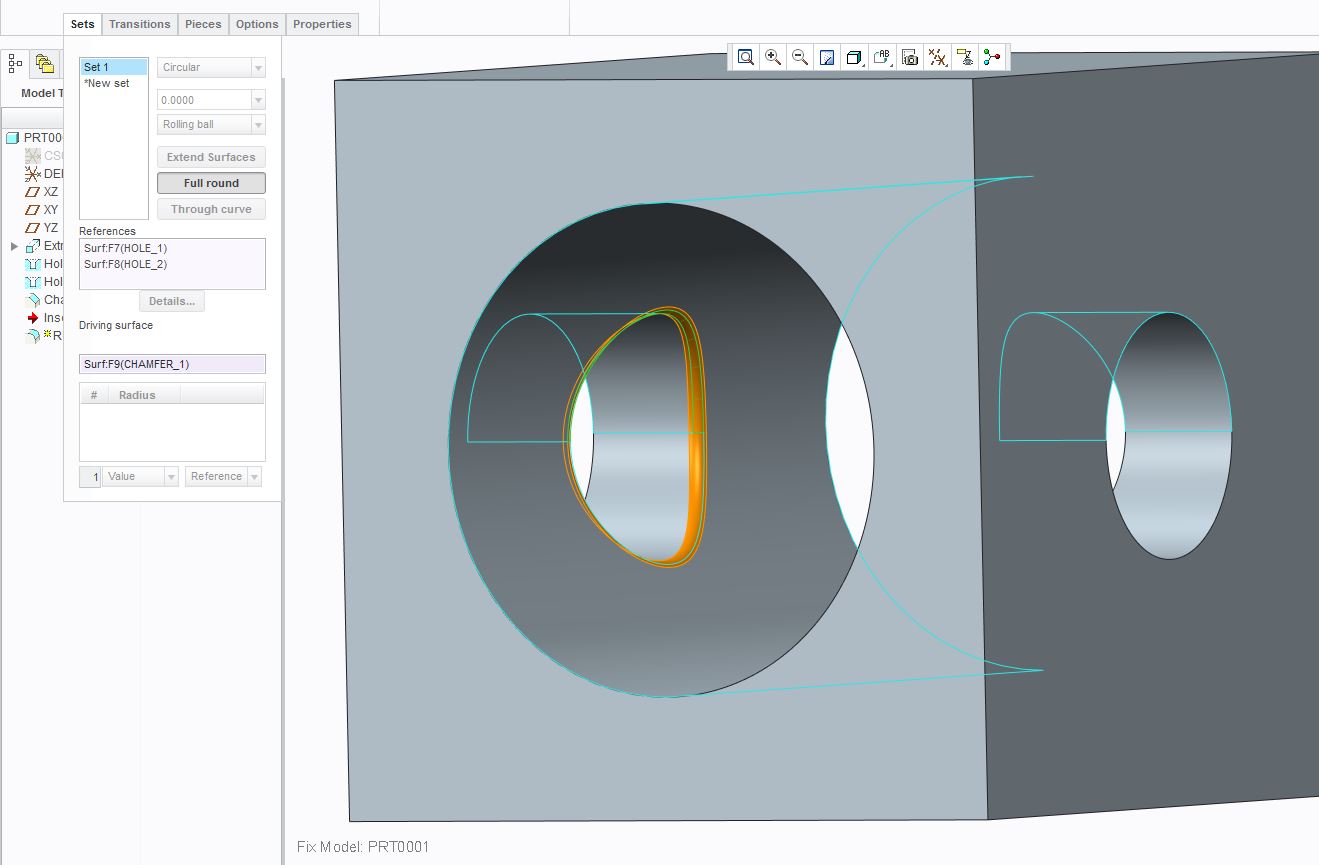
Looking a the problem, i have two holes different whose axis are perpendicular and intersecting and the diameter of one is bigger then the other.
I added a chamfer on the edge resulting from the intersection of this two cilindrical surfaces, and now i would like to add a full round as well so that the chamfer surface resulting will disappear.
But i can't select the whole cilindrical surfaces for each one of them, Creo let me select just half part, preventing me from obtaining what i want to. In fact, by selecting only half side for each surface, full round keeps the chamfers in the side where i could not select the surfaces.
I tried using extrusion as well as hole features, getting the same behavior. Is there a way to achieve what i want to?
But most important, was i clear enough? I am afraid to not explain myself very well due to my bad english.
Thanks for taking my problem in consideration.
Giuseppe.
This thread is inactive and closed by the PTC Community Management Team. If you would like to provide a reply and re-open this thread, please notify the moderator and reference the thread. You may also use "Start a topic" button to ask a new question. Please be sure to include what version of the PTC product you are using so another community member knowledgeable about your version may be able to assist.