1-Visitor
September 12, 2013
Solved

how to show tolerance on drawing with letters instead of a nominal value

  • September 12, 2013
  • 1 reply
  • 6541 views

Hello,


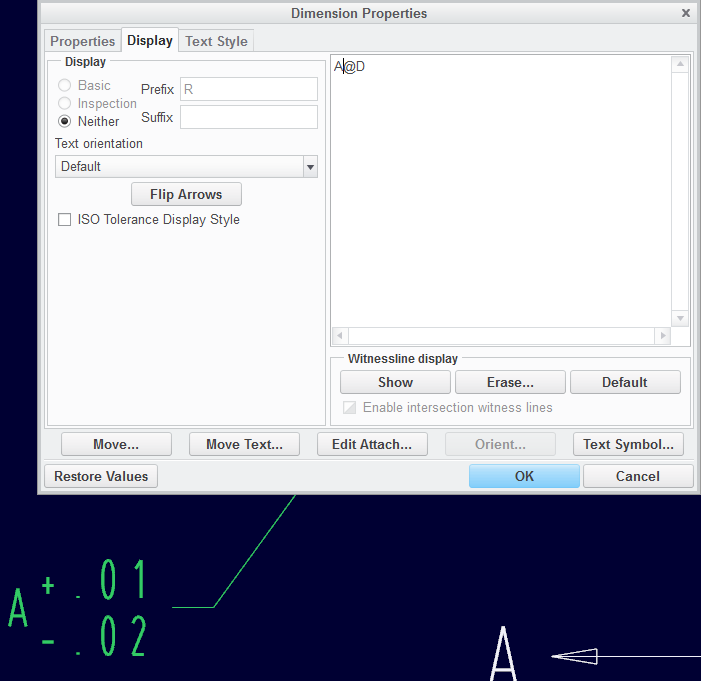
need help with showing a tolerance value at dimensions with letters displayed instead of a nominal value.


V%C3%BDst%C5%99i%C5%BEek.PNG

thnx for help


This thread is inactive and closed by the PTC Community Management Team. If you would like to provide a reply and re-open this thread, please notify the moderator and reference the thread. You may also use "Start a topic" button to ask a new question. Please be sure to include what version of the PTC product you are using so another community member knowledgeable about your version may be able to assist.
Best answer by TomD.inPDX

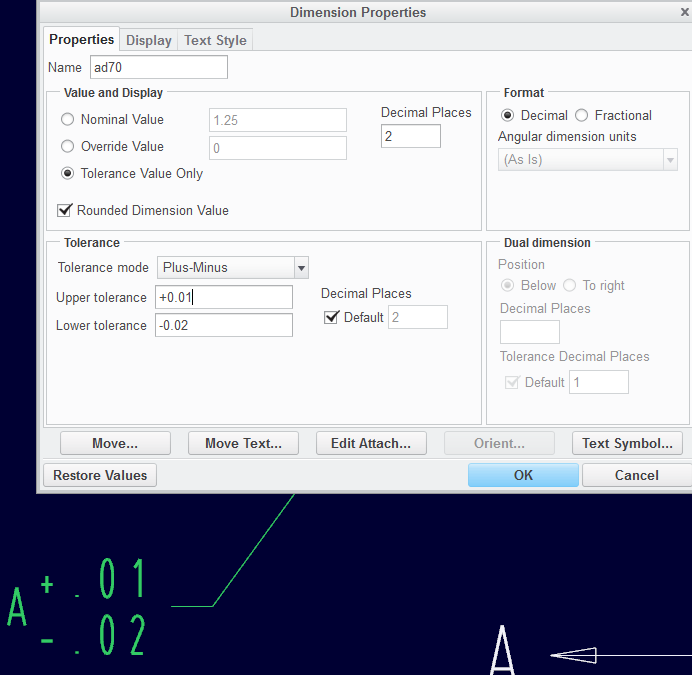
The easiest way is to add a driven dimension in the drawing (add dimension) and set the tolerance and use the Tolerance Only option in the Dim Properties and prefixing the alpha character.

But there has to be an easier way.

Which method did you use, Blue?

tol_on_dim1.PNG

tol_on_dim2.PNG

1 reply

17-Peridot
September 12, 2013

Just like this?23.jpg

1-Visitor
September 12, 2013

yes, like this...

Dale_Rosema
23-Emerald III
23-Emerald III
September 12, 2013

Is there certain letter that you are going to be putting in the dimension (i.e. parameter names) or are you just going to assign them on the fly?

If is is parameters:

(in the dimension text) &O (letter o for owning the dimension - and cancelling the actual dimension), space, &parameter_name

&O &parameter_name1

else:

(in the dimension text) &O, space, A (letter you want in the dimension)

&O A

Then set the tolerance in the tolerance box, or type it after either of the strings above.

&O &parameter_name1 +/-.005

Thanks, Dale