

Yogesh.T
14-Alexandrite
August 12, 2025
Solved

How to use JPEG or similar picture for Design reference during sketching

  • August 12, 2025
  • 3 replies
  • 969 views

Hi all,

I have a broken piece I need to fix. How can I superimpose the pic in sketcher to draw exact profile to match and give me a accurate or close match. I have to make the red piece (See Image). Thickness is known (1.2MM). 

This can be a good lesson for reverse engineering. 

Copying the existing for  upgrade .

Thanks in advance. 

-Yo

Best answer by StephenW

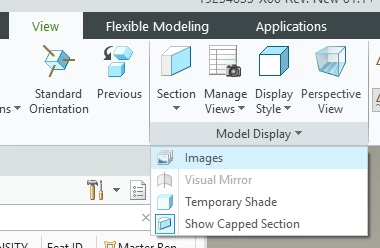
In the model, go to View, Model display, Images, you'll have to "scale" the image to get the size approximation. right and placement is always fun, but it works well.
StephenW_0-1755004926363.png


3 replies

StephenW23-Emerald IIIAnswer
23-Emerald III
August 12, 2025

In the model, go to View, Model display, Images, you'll have to "scale" the image to get the size approximation. right and placement is always fun, but it works well.

StephenW_0-1755004926363.png


KenFarley
21-Topaz II
August 12, 2025

I'd imagine the scaling would be the toughest part of getting things right, especially because photos are usually not absolutely accurately orthogonal to the features of interest. Adds a bit of distortion. Plus, the rotation to align with your model, etc. Persnickety process.

When I've had to do things like this I also found being able to print a mylar or other accurate geometric layout was really helpful to make sure I wasn't missing anything, that fit is nice and tight, etc.

Yogesh.T
Yogesh.T14-AlexandriteAuthor
14-Alexandrite
August 12, 2025

Interesting! Mylar Print...

I used to print a presentation transparency ..:)) , Past it on my screen and literally trace it ...hahaaa.

This feature, now is new added to newer versions and is very helpful ...but still does not beat my traditional way.. :)))

Yogesh
Michael
16-Pearl
16-Pearl
September 14, 2025

Once you place the image use Creo’s image scale button (in the image ribbon) to resize the image horizontally to exactly what you want. No need to do this outside of Creo. 

Michael Bourque
Community Moderator
September 24, 2025

Hi @Yogesh.T,


I wanted to see if you got the help you needed. 


If so, please mark the appropriate reply as the Accepted Solution. It will help other members who may have the same question. 


Of course, if you have more to share on your issue, please pursue the conversation. 


Thanks,
Anurag