1-Visitor
May 20, 2022
Question

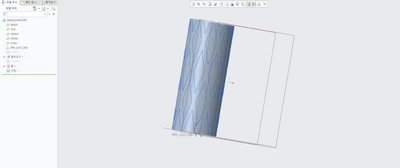
I need to extrude a wrapped sketch

  • May 20, 2022
  • 2 replies
  • 4364 views

I fixed the sketch and successfully made a wrap, i want to extrude this exact shape outwards. 
Is there a way to extrude this wrap?

4-wrap.png

2 replies

kdirth
21-Topaz I
21-Topaz I
May 20, 2022

Extrude is only a linear operation in Creo and does not work around a curved surface.  You will need to trim a surface by the sketch and thicken the surface (as shown in examples in previous discussion).  From your image, it appears you have a solid.  You can change the solid into a surface or copy the outside surface and remove the solid.

There is always more to learn.
1-Visitor
May 23, 2022

If it isnt possible to extrude a wrapped sketch. Is it possible to curve a sketch then extrude it? or curve an existing extruded sketch?

kdirth
21-Topaz I
21-Topaz I
May 23, 2022

The closest thing to what you are describing is the thicken operation:

  1. Create a surface.
  2. Wrap a sketch onto the surface.
  3. Trim the surface by the wrap curves.
  4. Thicken the surface.

kdirth_0-1653308339604.png

kdirth_2-1653308430383.png

kdirth_3-1653308475084.png

kdirth_4-1653308503324.png


There is always more to learn.
Dale_Rosema
23-Emerald III
23-Emerald III
May 20, 2022

It looks like your other discussion is getting a lot more traction in getting an answer:


https://community.ptc.com/t5/3D-Part-Assembly-Design/I-m-trying-to-make-a-stent-but-creo-identifies-wrong-sketch-as-a/m-p/795087#M123867
