
1-Visitor
January 7, 2014
Solved

Imported feature has a volume of 0.00

  • January 7, 2014
  • 2 replies
  • 2566 views

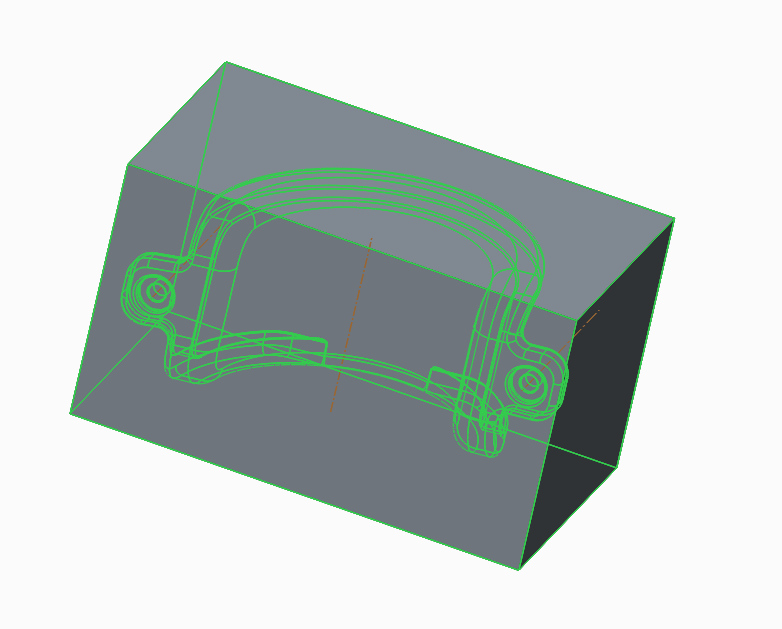
I'm attempting to take an igs file and build a mold around it in Creo 1.0, but when I use the cutout tool it doesn't actually remove any material to the other part in the assembly. I can see the outline of the first part outlined afterwards and the software says "Cut out has been created successfully." But when I do a volume check the second part hasn't lost material - and if I cut away part of that piece the cutout doesn't go with it. I've attached the IGS file and my assembly, and the screenshot is of the mold part with all features highlighted.Capture_6.PNG

This thread is inactive and closed by the PTC Community Management Team. If you would like to provide a reply and re-open this thread, please notify the moderator and reference the thread. You may also use "Start a topic" button to ask a new question. Please be sure to include what version of the PTC product you are using so another community member knowledgeable about your version may be able to assist.
Best answer by dschenken

There's probably a hole in the surfaces that prevents it from being solid, and with it from being used to cut out material.

Use the Import Doctor on the feature to check for and repair - missing surfaces, unattached edges, et al. You may also patch missing surfaces by creating separate surfaces and then attempting to Solidify the part. If Solidify works, you're done. If not - keep looking.

2 replies

dschenken1-VisitorAnswer
1-Visitor
January 7, 2014

There's probably a hole in the surfaces that prevents it from being solid, and with it from being used to cut out material.

Use the Import Doctor on the feature to check for and repair - missing surfaces, unattached edges, et al. You may also patch missing surfaces by creating separate surfaces and then attempting to Solidify the part. If Solidify works, you're done. If not - keep looking.

1-Visitor
January 8, 2014

Thank you David, that was exactly the problem. Well, sort of - the model apparently had a few extra surfaces that weren't tied to a component that were keeping me from using the repair function. Once I got that sorted it all worked out nicely.