10-Marble
September 30, 2024
Solved

In 2D Creo drawing, How to automate centre line for hexagone

  • September 30, 2024
  • 2 replies
  • 1793 views

While creating a 2D drawing, how to achieve to have a default automated center line for oblong rectangle or hexagon

Best answer by StephenW

@AB_10736884 

If there is no axis in the model, there will be no centerline in the drawing. In the model, there is no default axis for oblong, rectangle or hexagon.

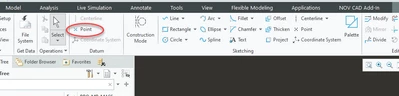
During feature creation of the  oblong, rectangle or hexagon, you can add and "point"  and when the sketch is extruded, it will create and axis. That can be the axis you can show in a drawing.


StephenW_0-1727693195472.png


2 replies

Catalina
Community Moderator
September 30, 2024

Hi @AB_10736884,


Thank you for your question! 


I’d like to recommend to bring more details and context to your initial inquiry. 

It also helps to have screenshot(s) to better understand what you are trying to do in your process. 


Please refer to this guideline to make your questions more likely to receive a quick and useful answer. 

This will increase your chances to receive meaningful help from other Community members. 


Thank you for your participation and please let me know if you need further assistance! 


Best regards,

Catalina | PTC Community Moderator
StephenW23-Emerald IIIAnswer
23-Emerald III
September 30, 2024

@AB_10736884 

If there is no axis in the model, there will be no centerline in the drawing. In the model, there is no default axis for oblong, rectangle or hexagon.

During feature creation of the  oblong, rectangle or hexagon, you can add and "point"  and when the sketch is extruded, it will create and axis. That can be the axis you can show in a drawing.


StephenW_0-1727693195472.png


10-Marble
September 30, 2024

@StephenW Thanks for workaround.