
20-Turquoise
August 3, 2023
Solved

Inconsistent handling of component mass in an asm. Is this a bug?

  • August 3, 2023
  • 5 replies
  • 4706 views

I have a case open at PTC showing inconsistent assembly handling of component mass. See article CS396826.

The problem occurs for a component with no solid geometry and an assigned mass of some value and with 0 for the assigned volume.


I have attached models.7z with a sample assembly (asmtest.asm) with 2 components:

  • assigned-mass.prt
    • model with no solid geom and an assigned mass of 5.0
  • real-mass.prt
    • model with actual geom and mass calculated the "normal" way
  • These models have been created with Creo Parametric 6.0
  • You will need to set config.pro option mass_property_calculate automatic

If this is the only component in the asm then it's assigned mass is not used by the asm. Screenshot (Creo Parametric 10.0.1.0) showing the asm mass of 0 when real-mass.prt is suppressed and note the asm has 0.0 even though assigned-mass.prt is showing 5.0.
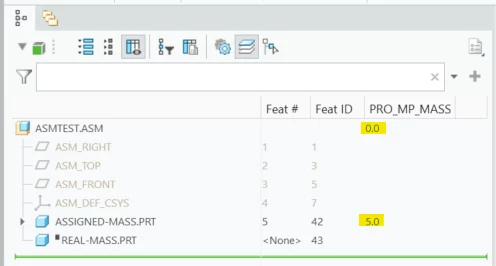
asm-incorrect-mass.png


After resuming the real-mass.prt the asm mass now correctly has 7.2664 which is including the mass of the assigned-mass.prt:
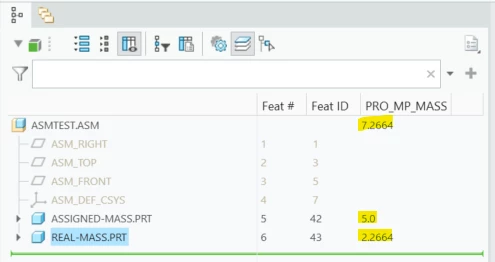
asm-correct-mass.png


So we have shown the asm level mass has inconsistent behavior. I have tried Creo Parametric releases 6.0 thru 10.0 and all have this issue - have not tried any earlier releases. I want to hear your opinions on "Is this a bug or not?"
 

Best answer by RandyJones

The latest from PTC Tech Support is this:


"The R&D team has formulated a problem statement (PS) to enhance the functionality of Creo Parametric. However, they have not provided a timeline for its implementation. As of now, we recommend using the workaround that was outlined in the previous email."


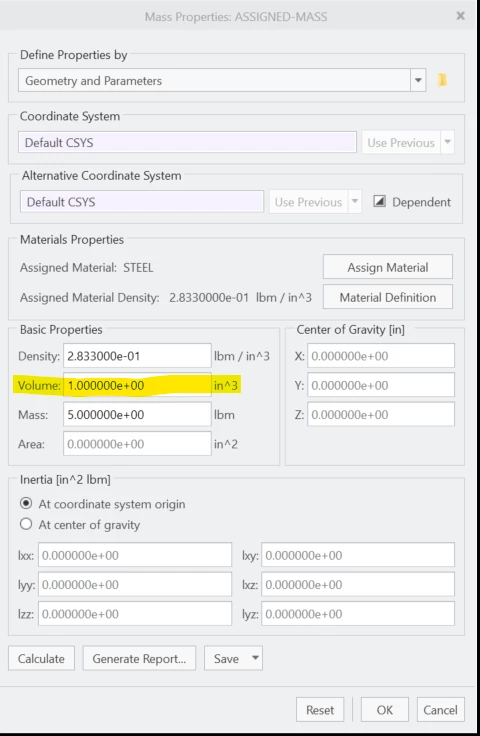
The workaround is to add a dummy volume value to the assigned mass properties which is what we are doing:

dummy-volume.png


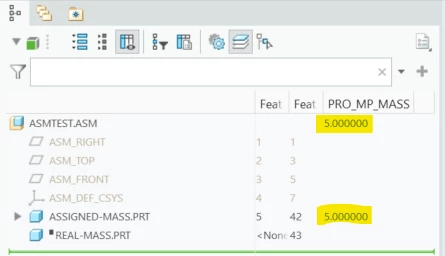
After doing this the asm mass now is showing the mass of the assigned-mass.prt as expected. It is using the assigned mass (as I would expect) vs the mass you get from the density x volume:

dummy-volume-correct-mass.png


So PTC is refusing to call this a bug however instead calling this a "problem statement (PS) to enhance the functionality of Creo Parametric".  Which is not yet documented in the article CS396826.

So far the only documentation of this is in the case I have open with them.

5 replies

tbraxton
22-Sapphire II
22-Sapphire II
August 3, 2023

Have you run a report using this config option to verify that Creo is handling the component with assigned mass when getting the "wrong" result?


Set the configuration option mp_calc_level to all_models to include the summary of assembly components, details of assembly components, and the summary of bodies in the assembly mass property report, and the summary and details of bodies in the part mass property report.

20-Turquoise
August 3, 2023

Running a mass properties report shows the same inconsistent values for mass.


Setting mp_calc_level to all_models makes no difference - still shows the same inconsistent values for mass. As shown in POR_MP_MASS and in the mass properties report.

tbraxton
22-Sapphire II
22-Sapphire II
August 3, 2023

Using Creo 7.0.9 I get these results using your test models. It appears that something is not right with the way this works (unless PTC has documented why this is happening). I saw nothing in the help files that explains why these results are not as expected. 

I suspect it is working to PTC specification due to the fact that your assigned mass model does not have solid geometry in it. If you add some solid geometry to the assigned mass part model, then the calculations behave as expected (see the last screen shot). I have used assign mass but never in a part without some solid geometry in it and it has worked as expected for MP calculations. I believe the intent of assigned mass functionality is to be used for a model with some solid geometry. Please report back what the response is from PTC support when you get an answer.


tbraxton_0-1691083084104.png

tbraxton_1-1691083092123.png

tbraxton_2-1691083447693.png


23-Emerald III
August 3, 2023

I gave up on assigned mass some time back when it didn't do what I wanted. I don't remember what the specifics were of my frustration.

When I have surface models, I typically will just go add a "mass" at the cg and adjust the density so I get the correct mass and CG location. 


I'm one of those people who send out surface only models in an effort to reduce possibility of giving away too much information.

Chris3
21-Topaz I
August 7, 2023

PTC told me at one point in order to save calculation time and memory that they programmed mp_calc_level to all_models to just eliminate all models with 0 volume. Presumably they thought that people didn't care about those items so they just left them out of the report. This can be incredibly frustrating if the reason you are running that report is to find those components.


Its possible that your issue may be related to that. As @StephenW mentioned partly for this reason we try not to assign mass. Instead you can set the density with a relation:

MP_DENSITY=10/PRO_MP_VOLUME


where 10 is the mass you want the part to be. If its an assembly you can import it as a part and then handle it that way (assuming you don't actually need it as an assembly).

RandyJones20-TurquoiseAuthorAnswer
20-Turquoise
August 7, 2023

The latest from PTC Tech Support is this:


"The R&D team has formulated a problem statement (PS) to enhance the functionality of Creo Parametric. However, they have not provided a timeline for its implementation. As of now, we recommend using the workaround that was outlined in the previous email."


The workaround is to add a dummy volume value to the assigned mass properties which is what we are doing:

dummy-volume.png


After doing this the asm mass now is showing the mass of the assigned-mass.prt as expected. It is using the assigned mass (as I would expect) vs the mass you get from the density x volume:

dummy-volume-correct-mass.png


So PTC is refusing to call this a bug however instead calling this a "problem statement (PS) to enhance the functionality of Creo Parametric".  Which is not yet documented in the article CS396826.

So far the only documentation of this is in the case I have open with them.

Chris3
21-Topaz I
March 12, 2024

I have opened tickets for this exact reason in the past as well and they refused to call it a bug and fix it. They called it "working to spec" which is outrageous. Who would write a spec that says that.

23-Emerald IV
March 12, 2024

You misunderstand what 'working to spec' means to PTC.  If a spec to describe a function *does not explicitly state* that it needs to work (or not work) a certain way, then by definition it is 'working to spec', regardless of how illogical the behavior might be.  The developers simply do what they are told to.  They do not use the software for a living.

12-Amethyst
February 28, 2024

To answer your question, yes, it is a bug.  However, PTC would much rather whitewash it than fix it.  So, since they gave a workaround, they can avoid fixing it.  It does not matter to them that the next person will come along with the same issue and waste a bunch of time to eventually have the same result.  This just shows again that PTC does not care about customers.  They certainly have no respect for our time when dealing with their bugs.