
1-Visitor
February 29, 2012
Solved

Inserting a Hex shaft

  • February 29, 2012
  • 3 replies
  • 3350 views

So, i'm trying to assemble two parts in ptc. A hex bearing and a hex shaft. But from I can see, there is no way to "insert" the shaft or mate the edges together in order to move it into place. When i try that it simply rotates the part.


This thread is inactive and closed by the PTC Community Management Team. If you would like to provide a reply and re-open this thread, please notify the moderator and reference the thread. You may also use "Start a topic" button to ask a new question. Please be sure to include what version of the PTC product you are using so another community member knowledgeable about your version may be able to assist.
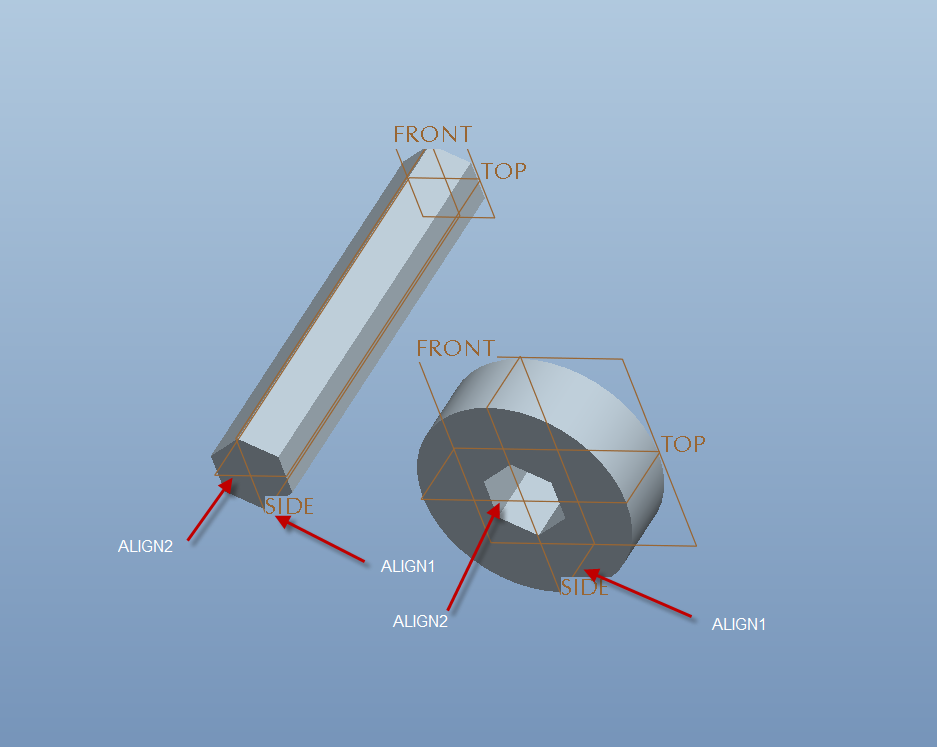
Best answer by tmorishita

Hadrian,

If you created your hex parts symmetrically about datums as shown, then you can assemble them by aligning the appropriate datums.

HEX.png

Hope this helps.

Tim

3 replies

24-Ruby III
February 29, 2012

Hadrian,

you can for example use following constraints:

1.] mate green surfaces

2.] mate red surfaces

3.] align yellow surface and blue surface

See attached pictures.

before.png

after.png

Martin Hanak

1-Visitor
February 29, 2012

I agree with Mark's solution, but if you want the shaft to be centered in the hole you'll have to create an axis through the center of the shaft and another axis through the center of the hole. When you assemble them just begin with "automatic" as the constraint type and creo will correctly align the axes, then mate the yellow surfaces shown in Mark's image.

If I was making the axes I would go into sketcher, determine the center of the hex with construction lines, and place a geometry point in the center, then in model space I would place an axis through the point and normal to the end of the shaft (or face of the ring that has the hex hole).

1-Visitor
February 29, 2012

Hadrian,

If you created your hex parts symmetrically about datums as shown, then you can assemble them by aligning the appropriate datums.

HEX.png

Hope this helps.

Tim