
8-Gravel
January 19, 2017
Solved

Is there any way to pass the data from the structure tree to a excel file?

  • January 19, 2017
  • 3 replies
  • 4107 views

I mean,


I want to export the data from the structure tree (part and assembly names) to a excel file. For example to make a bill of materials.


Thanks in advance.

Best answer by PeterKehoe

Use the command "Write Tree" save the structure tree to a text file which can then be opened in Excel.
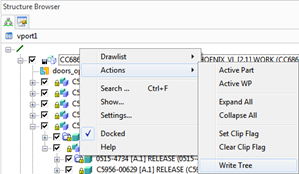
One tip is to have "Details" mode on so more information is included in the file than just the 'instance" name.

3 replies

17-Peridot
January 19, 2017

...never mind.  I always miss the posts that applie to Creo Direct 

Ed138-GravelAuthor
8-Gravel
January 19, 2017

Thank you for you too Antonius...

Don´t worry, may be some day you will be the champion of ptc community...

1-Visitor
January 19, 2017

Use the command "Write Tree" save the structure tree to a text file which can then be opened in Excel.

One tip is to have "Details" mode on so more information is included in the file than just the 'instance" name.

Ed138-GravelAuthor
8-Gravel
January 19, 2017

Hello,

I did it and then I changed the file extension to a ".xls" ( Excel file). Excel opened this file without any problem.

Thank you!!!

14-Alexandrite
January 19, 2017

Hello,

After you save the file out from the "Write Tree" option, start Excel and then open the file and follow the prompts to import the textual data into the worksheet. Do not change the file extension and try to open it.

Mike: The Model Manager option will only work if they have the BOM module turned on in Model Manager and I believe the BOM licenses also has to be present to make this work. But great idea none the less.

Regards,

Thom

1-Visitor
January 19, 2017

In Model Manager, right click your assembly and select BOM>Scan. This allows you define the depth of the tree to scan.

Then in the BOM Editor you can send to MS Excel.

Mike

BOM.png

1-Visitor
January 19, 2017

The question was how to get the data from the Structure Browser, not Model Manager. Your method is fine if you use Model Manager and have a license for the BOM module.

1-Visitor
January 19, 2017

Sorry, I guess I'll consider myself lucky for having the BOM module.

I only mentioned it because your method of turning on "Details" did not work in my test. The TXT file was the same in either case.

Thank you.

Peter Kehoe wrote:

The question was how to get the data from the Structure Browser, not Model Manager. Your method is fine if you use Model Manager and have a license for the BOM module.