
14-Alexandrite
December 13, 2024
Solved

ISSUE IN MIRRORING ASSEMBLY

  • December 13, 2024
  • 2 replies
  • 1147 views

Hi, in CREO ADVANCED PLUS 9 I have to mirror THE 4c28fw08500.asm wrt the green SYM_TRASV plane.

If I check the "Reuse selected model" I obtain the wrong position in the picture below:
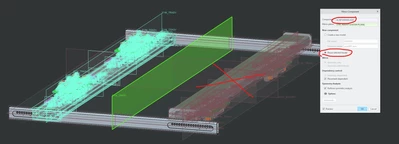
 

MB_10508968_1-1734098068184.png


Instead, I want to obtain the correct position that I have when I check the "Create a nex model", but I don't want to create a new code model.
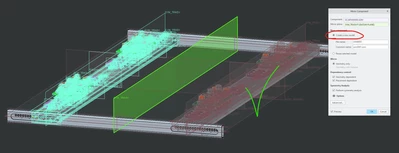
 

MB_10508968_2-1734098112998.png

How can I fix this problem?


Thank you.

Best answer by kdirth

What you are asking for is not a mirror.  It is closer to a pattern.


If the original location is defined with respect to the datum plane.  You can use that dimension to control the placement (or pattern) of the second one.  Otherwise, you can create a measurement feature and use that to control the placement.

2 replies

kdirth
21-Topaz I
kdirth21-Topaz IAnswer
21-Topaz I
December 13, 2024

What you are asking for is not a mirror.  It is closer to a pattern.


If the original location is defined with respect to the datum plane.  You can use that dimension to control the placement (or pattern) of the second one.  Otherwise, you can create a measurement feature and use that to control the placement.

There is always more to learn.
Catalina
Community Moderator
December 20, 2024

Hi @MB_10508968 ,

I wanted to see if you got the help you needed.

If so, please mark the appropriate reply as the Accepted Solution or please feel free to detail in a reply what has helped you and mark it as the Accepted Solution. It will help other members who may have the same question.

Of course, if you have more to share on your issue, please pursue the conversation.

Thanks,

Catalina | PTC Community Moderator
15-Moonstone
December 20, 2024

I agree with kdirth a pattern would be the way to get what you want. I wouldn't use a mirror for an assembly anyway it can cause problems though it is better these days than it was in 2000i.