13-Aquamarine
January 13, 2015
Question

January 2015 TC Meetings: Enhancement Requests for Creo

  • January 13, 2015
  • 67 replies
  • 21844 views

Hi Everyone...


It's that time again! Each January, PTC/User holds it's bi-annual "face to face" Technical Committee ("TC") meetings. These meetings are held twice a year with the Winter Session being held next week at PTC Headquarters in Needham, MA.These meetings are mostly attended by representatives of large, influencial customers who pay to send their personnel directly to PTC for meetings with Product Line Managers, software developers, and technical staff.


Every 6 months or so I (foolishly) try to gather enhancement requests, issues, and problems from Community members who cannot attend the TC meetings. Obviously I work for one of those large, influencial customers so I will be in attendance to represent their interests. Still, I believe there's tremendous value in the contributions of PTC Community members who do not work for companies with the means to lobby PTC directly for enhancements.


In order to track submissions by Community members, I've previously posted an exhaustive spreadsheet of requests and issues complete with a "disposition" for each. I've reposted that spreadsheet here for reference. For this next set of meetings, I think it's necessary to clear the docket a bit. Many of the requested enhancements have either been added to Creo 3.0, slated for implementation in Creo 4.0, rejected outright, or "overcome by events" meaning they're not as relevant as they once were. Continuing to manage and update such a massive spreadsheet with stale data is a tremendous chore. I think the best way to move forward is to go back to the start and gather requests anew.


So then... if you have requests or nagging problems with Creo 2.0 or 3.0 now is the time to speak up.


Please know that topics like the User Interface (ribbon) and annoyances with the color schemes are perennial complaints which are often discussed... but rarely changed based on TC input. The most useful enhancement requests are very specific. Vague requests like "fix the measurement tool" or "improve the interface" are not as easy to fight for as a more focused request. Here are some tips:

  • Errors or problems should be described well. Please try to completely describe your request or issue clearly and concisely (if possible).
  • Screenshots and pictures are tremendously helpful even if they're just mock-ups of some new feature you'd like to see. I realize it takes time to put these together but this makes your issue stand out and helps communicate your request to others.
  • Use Cases are very helpful. "Use case" is a term we use to describe a particular work scenario that requires attention or demonstrates the need for a particular enhancement. For example, this is an example of a "use case" (this is a real request I've submitted):
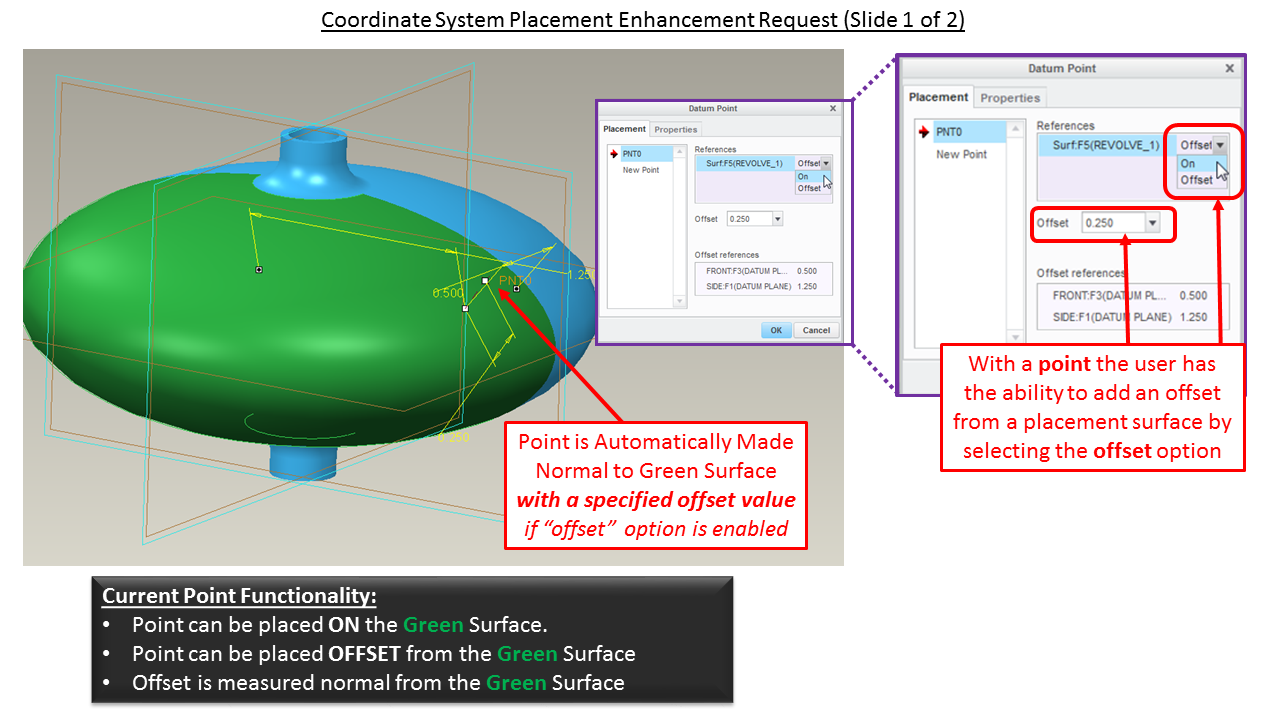
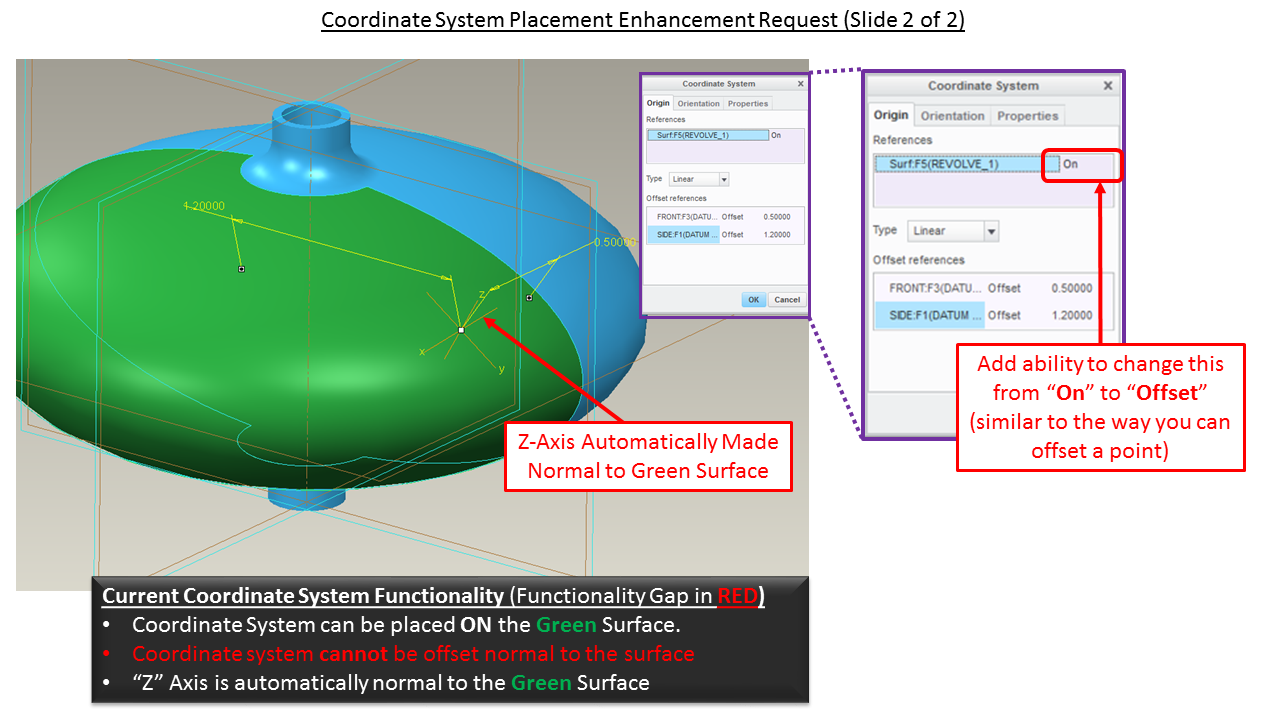
    • "I have an irregular surface - such as an elliptical tank. I'd like to drop a coordinate system offset from the irregular surface such that one axis of the coordinate system is always normal to the placement surface but offset at some height above the surface. Currently the only way I can do this is to add a point on the irregular surface offset by the appropriate amount, then add a coordinate system on the point. It's possible to drop a point on a surface offset by a specific height and it's possible to drop a coordinate system on a surface with the normal automatically adjusting to the surface but it's not possible to create a coodinate system with an offset and the automatic normal. See slides below (click for larger images)...Slide1.PNGSlide2.PNG


A picture is definitely worth a thousand words in this instance. The better you can describe your issue, the easier it is for me to bring it to the attention of the PTC developers and Product Line Managers.


As always, our goal is to make positive contributions so that we may influence future releases of the software. Reasonable requests supported by sound logic and a true business need have the best chance of being well received. These are professional meetings held at the pleasure of PTC and it's employees. I'm an invited guest at this event and I'm also representing my employer so I need to remain professional. While I'll do my best to make a case for incorporating your enhancements, please remember that I probably can't get to every request. Numerous meetings occur simultaneously and it's tough to hop around between rooms.


Add your comments, requests, pain points, and feedback to this thread. I'll do my best to get it in front of the developers. I'll catalog the requests and post a synopsis and a final report after the meetings.


Remember to keep it positive if possible... but let's hear what you have to say!


Thanks!!

-Brian


PS: I am currently a member of the following Technical Committees so I can address topics in any of these areas:

  • Routed Systems - Cabling/Piping & Schematics
  • Core Modeling
  • Model Based Definition (ASME Y.14.41 Standards)
  • System Administration
  • Sheet Metal
  • Detailing
  • Creo NC / Manufacturing
  • Creo View / Visualization
  • Windchill


If you're interested in joining a TC, go to the PTC/User Website, create a login, and sign up!


Thanks everyone!

-Brian


This thread is inactive and closed by the PTC Community Management Team. If you would like to provide a reply and re-open this thread, please notify the moderator and reference the thread. You may also use "Start a topic" button to ask a new question. Please be sure to include what version of the PTC product you are using so another community member knowledgeable about your version may be able to assist.

67 replies

15-Moonstone
January 15, 2015

Hi Brian,

Thank you so much for giving us an input to the Creo product developement team.

I'd like to submit my top irritation with Creo. NOTE: This is already represented with what you zhao copied (4. Sketcher dimensions that stay put), but my request is more specific. I will copy my user idea submission.

Fix radii in sketch constraints so it doesn’t come unglued when the radii is modified.

When modifying the original value of the fillet in a sketch there are 2 different conditions that are causing constraint related failures.

1) 1) When there are 2 intersecting lines that are not in the horizontal or vertical position.

2) 2) When there is an intersection between entities that are not lines.

With the shown example I have locked the dimensions that I need to keep the sketch stable.

OriginalCondition.JPG

With case 1 even though the intersection is dimensionally locked when a fillet is applied it replaces these constraints.

LockRemoved.JPG

Creo even recognizes the error it creates as shown below.

CreoError.JPG

When you modify the fillet to the needed size it will invariably move the position as shown.

PositionChanges1.JPG

With case 2 instead of having 2 lines I have replaced one of the lines with an arc. (The same type of results apply with using a spline), once again when I place a fillet it removes the original locked constraints. Once again in the message tree you see the “Dimensions to Endpoint Deleted” error. Additionally another troublesome entity is introduced. Notice that the system replaces out what should be a construction arc with a construction line.

LineConstruction.jpg

When you modify the fillet to the needed size it will invariably move the position; see below.

PositionChanges2.JPG

With case 1 the work around is to replace the dimensional constraints with the original locked dimensions. This allows the constraints to work correctly, but it adds this extra step every time. If the locked dimensions truly were locked this would not be necessary.

With case 2 the work around is more complicated. The replacement of what should be a construction arc with a construction line means that I can’t just add X and Y locking dimensions to make constraints work correctly. The construction line tries to match up with a tangency on the arc and depending on the size of the fillet can really distort the results. In order to fix the constraints you have to extend the arc back to the original intersection (prior to the fillet), divide the arc at the place where the fillet intersects it, change the arc to a construction entity and then add the X and Y locking dimensions. If the locked dimensions were truly locked and if the construction entities at the intersection retained their original entity type the work arounds would not be necessary.

13-Aquamarine
January 15, 2015

Hi Paul...

Great to hear from you! If memory serves me, I actually documented this problem in the past and mentioned it to the PTC developers. It received a positive response (which is sometimes all you really get). Any time there are pain points like this which seem to be easily fixed, I feel there's hope.

I'll happily add this to the list and try to bring it up again. Your screen shots definitely help to communicate the problem.

Thanks again!

-Brian

15-Moonstone
January 19, 2015

Brian,

It is very appreciated that you have gone to the great trouble of helping all of us out.

Hopefully this effort of yours will make Creo a better product for many users.

Thanks!

1-Visitor
January 15, 2015

Hi Brian,

Enhancement request: Right click to open a drawing.

It would be nice to be able to open a drawing of a part or assembly by selecting the part or assembly in the model tree or on the screen, then using the right mouse button.

Thanks,

Chris

13-Aquamarine
January 15, 2015

I agree... the only wrinkle I see is this - what happens if you have more than one drawing associated to a model? Also, will that right-mouse click only open a drawing if it's in your current working directory (or workspace)? What happens if the drawing is not in the workspace (or current directory)? Should the file be retrieved into the workspace (if using Windchill)? And if so... again the question pops up about what to do if there is more than one drawing associated to the same model.

Note I'm not trying to shoot down this idea... I'm trying to flesh out the details. It's likely the PTC developer would immediately ask these questions. They'll want to know we've thought out precisely how this feature would work and what it would and would not do.

It helps for us to have answers to these questions before PTC puts me on the spot to deliver an answer.

There's a good amount of sparring that occurs in these meetings. It's usually good natured sparring but occasionally there's some thinkly veiled sneering and sniping. After all, imagine a room full of engineers, programmers, and (eww) managers.

Which one has the bigger ego? They're all pretty insufferable after a week of 10+ hour days... so it's better to have answers at the ready when you go into an environment like that!

21-Topaz I
April 2, 2015

I know this is a little late but you said there are two meetings a year. I wanted to respond to these questions. These are all assuming either Intralink or PDMLink are involved. All bets are off when they are not.

Q. What happens if you have more than one drawing associated to a model?

A. Easy. It opens a dialog box that shows all the drawings they are directly attached to. Just like a family table dialog that displays when opening a generic model. It should open any drawing of an assembly where a part is assembled to.

Q. Will that right-mouse click only open a drawing if it's in your current working directory (or workspace)? What happens if the drawing is not in the workspace (or current directory)? Should the file be retrieved into the workspace (if using Windchill)? And if so... again the question pops up about what to do if there is more than one drawing associated to the same model.

A. Again, easy. Same thing as the above family table dialog reference. There is current functionality that when I select File > Open I can type in the file name and extension of a CAD object that is not in my workspace and it will pull it in.

1-Visitor
January 15, 2015
13-Aquamarine
January 15, 2015

We've definitely beaten this horse many, many times...

And we've made many recommendations on needed enhancements. Creo 4.0 was to be the release when we finally saw a new, clear, highly functional text editor that incorporated many of the same features in the tool from that link you posted.

But ... I think the horse could be beaten again! I'm happy to advocate for a tool like this.

Thank you!

-Brian

1-Visitor
January 16, 2015

Brian,

For anyone that uses mechanism snapshots in drawing views.

Please urge PTC to redesign the snapshot functionality so it's no longer dependent on the explode state software code. The way the snapshot funtionality is designed if a component is changed, any snapshot that references the part becomes out of date and you have to update the snapshots. Let's say you modify a edge radius, but the position of the components do not move related to the change you made. You still have to update the snapshots and if you open a previously saved drawing you can't even see the assembly because the part is scaled in the drawing to show you something has changed. Pleae have PTC fix this. example image attached of a drawing where the cylinder is scaled up 100 times in size hiding an assembly that is 20 times the size of the cylinder.

Current software as designed is causing everyone to do unneccary work on drawings do to a simple dimension change.

cylinder+dwg.jpg

Thanks,
Don Anderson

13-Aquamarine
January 21, 2015

Hi Don...

We discussed the deficiencies with Snapshots today. We discussed the specific issues you're having. I think we have a commitment that in Creo 4.0, we may have some modifications to snapshot which might alleviate the problems you're seeing.

Thanks again!

-BRian

1-Visitor
January 16, 2015

Brian,

There was some interest on adding a mechanism clearance check that creats a surface in the components or colors the components in the assembly to show clearance between components that are moved thru a range of motion. Composite of all clearances measured in a motion analysis. Could you pass this on to the correct people?

Mechanism Clearance Check with Spatial Field Point Reporting (highlight on parts where clearance needs to be added) Currently able to to do it for one static state of the assembly motion but not automaticly and combine all motion time steps. Simalar to Abaqus composite results.

Thanks,
Don Anderson

http://communities.ptc.com/docs/DOC-4727

Copy and pass this link to the idea if the link does not work
http://communities.ptc.com/ideas/3640

13-Aquamarine
January 21, 2015

Hi Don,

This is a very nice, very detailed request. I actually missed the simulation and analysis meeting where this needed to be raised. However, you've done such a fine job of documenting it, I can just pass along your powerpoint presentation to the Technical Committee dealing with Analysis. I believe they will be able to run with this idea.

By taking the time to explain the problem, current functionality, and suggested future enhancements, you've made it easy to see the benefits of your idea. This is a textbook example of the way enhancements should be documented to insure they get seen by the right people.

I'm sorry I couldn't be in more places at one time (which is why I wasn't able to get this in front of the analysis team), but I will forward your documentation on and the proper people will see it.

Thank you again!

-Brian

17-Peridot
January 20, 2015

I will add this because it keeps coming up (including today)...

We need a way to automate, or at least assist inspection of a part to print.

The tool would:

1) create reference bubbles next to every drawing dimension

2) capture the value and tolerance into a table indexed with the bubble values (index no.)

3) allow data entry of captured values. Data import hooks would be nice form the CMM.

4) options for "first article", "random inspection", "serialized inspection", etc... and a means to store or catalog results as a form.

This is such a common practice that anything that PTC can do to help will certainly sell a few seats into the inspection departments of their major customers. I cannot see how this hasn't been requested at higher levels by some of the larger customers.

13-Aquamarine
January 20, 2015

Thanks Tom... I've added this one. I'm not sure which TC to bring this up in... but I'll see if I can synthesize this into a suggestion and get it in front of the right people.

Take care...

-Brian

1-Visitor
January 20, 2015

Thanks for posting the TC Enhancement Request "mega thread" again, Brian. Really helps provide some additional members the opportunity to be heard by PTC product management.

P.S. - This goes for everyone, if you're in Needham for the TC meetings this week feel free to send me a shout! Would love to take the opportunity to put some faces to names while you're in town.