

tbraxton
22-Sapphire II
22-Sapphire II
October 21, 2025
Solved

Load a light (.lgh) file in Creo Parametric

  • October 21, 2025
  • 1 reply
  • 648 views

According to the PTC documentation, this is supported. I am not able to get this to work in Creo 7, 9 , or 10.

tbraxton_0-1761061948995.png

Is anyone able to confirm that loading a light file works for them? It is possible my light files are corrupted in some way, if someone has a sample light file they can post here, I will try it. I have included one of my .lgh files for reference.
Best answer by remy

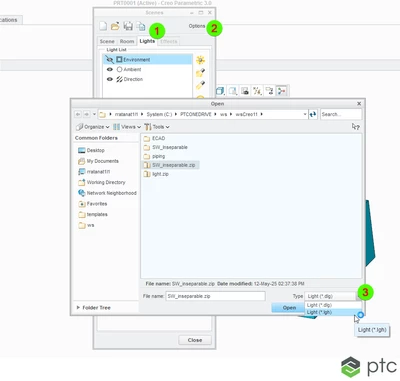
Like @MartinHanak hinted, the file is old and dated from Pro/ENGINEER 17.
I gathered an internal information that the support of lgh file has been discontinued in 2015.

Regression tests reveal that support is active up to Creo 3.0.

remy_0-1761123148393.png


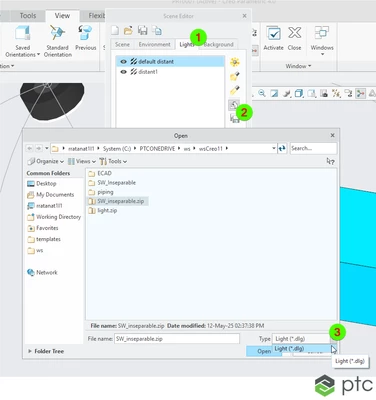
Starting with Creo 4.0 only .dlg files are supported :


remy_1-1761123208973.png


1 reply

24-Ruby III
October 22, 2025

Hi,

just comment ... your file contains following line. I guess such file is not compatible with Creo 7, 9 , or 10.

#Pro/ENGINEER TM Release 17.0 (c) 1988-96 by Parametric Technology Corporation All Rights Reserved. 97045

I saved lights in Creo 10.0.6.0 and attached it to this reply ... lights_Creo10.dlg.


remy21-Topaz IAnswer
21-Topaz I
October 22, 2025

Like @MartinHanak hinted, the file is old and dated from Pro/ENGINEER 17.
I gathered an internal information that the support of lgh file has been discontinued in 2015.

Regression tests reveal that support is active up to Creo 3.0.

remy_0-1761123148393.png


Starting with Creo 4.0 only .dlg files are supported :


remy_1-1761123208973.png


tbraxton
22-Sapphire II
tbraxton22-Sapphire IIAuthor
22-Sapphire II
October 22, 2025

@remy Thanks for checking internally on this. 


This is a link to the Creo 12 documentation, it clearly states that .lgh files can be loaded. Based on your findings this documentation is not accurate and has not been since Creo 4.

To Open a Light File

This should be corrected by the documentation team. Internally how are documentation errors reported and addressed? Is there a way to open a case for documentation problems?


If I were to send you some light files are you able to open them in Creo 3 and save them as .dlg files and send them back to me?