14-Alexandrite
September 8, 2023
Solved

MBD 3D Annotation / Can I make Annotations visible which are covered by solid geometry

  • September 8, 2023
  • 2 replies
  • 3182 views

Hi all,
We use Creo Parametrics 8.0, create MBD in 3D. Creating Combined States later used for 2D drafting views.


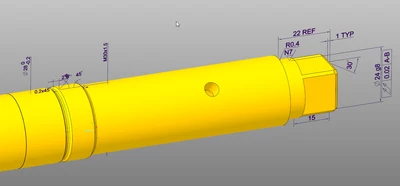
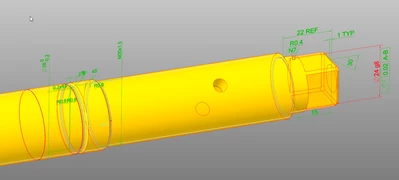
If I create Dimensions and Annotations in the 3D model, they remain invisible for the part covered by volume.


Example:

highlighted Annotations
Pius_0-1694155863718.png

not highlighted Annotations

Pius_1-1694155883442.png


Does anybody know, whether the visibility of the Annotations can be forced?


Thank's for help!


Best answer by Constantin

Hi Pius,
perhaps a silly question, but why don't you move the annotations outside the volume geometry?

2 replies

24-Ruby III
September 8, 2023

Hi,

I do not think it is possible to show annotation hidden behind shaded geometry.

Notes:

  • annotation is visible when hidden display style is used
  • you can move annotation to different plane to make it visible in shaded display style
Pius14-AlexandriteAuthor
14-Alexandrite
September 8, 2023

Hi Martin Hanàk
Is it possible to define the Hidden Line style for single combination states?


Pius

24-Ruby III
September 8, 2023

@Pius wrote:

Hi Martin Hanàk
Is it possible to define the Hidden Line style for single combination states?


Pius


Hi,

I do not know. Edit definition dialog does not enable it.

MartinHanak_0-1694162200114.png


15-Moonstone
September 8, 2023

Hi Pius,
perhaps a silly question, but why don't you move the annotations outside the volume geometry?

Pius14-AlexandriteAuthor
14-Alexandrite
September 8, 2023

Hi Constantin

no, not silly, but..., let me tell you the history of my "solution finding process".


1st: I had a cross-section cutting the shaft through its axis. This was okay for the dimensions, because the section gave free the dimension lines and annotations. But I had to realize that I need the outer faces to show some very small differences of diameter (that the diameter steps become visible with there edges). 

Pius_2-1694182405390.png


2nd: I did as you proposed, used an offset Plane and moved all annotations to it. But again, this looks only nice if the model axis of the specific combination state is set planar to the screen. Otherwise you need to zoom in to realize where the dimension belong to. In case the dimensions are placed in a plane crossing the center of the shaft, this is shown much more clear.

Pius_3-1694182443772.png


3th: now I did choose a compromise. I defined transparency for this combination state. 

Pius_1-1694181937400.png

Pius_4-1694182672930.png


Now we will need a decision in the team, whether it is good enough or not.


Have an nice weekend .

Pius