
14-Alexandrite
September 6, 2023
Solved

MBD 3D Annotation / changing text formats by copy paste (format painter)

  • September 6, 2023
  • 3 replies
  • 2560 views

Hello

We use Creo Parametrics 8.0, creating MBD in 3D and I face the following situation.


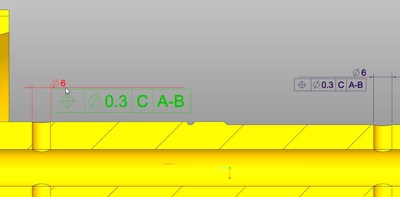
in an already created Combination State I have adjusted the text size of the so far created annotations and now I add new geometrical tolerance to one dimension.
Pius_1-1693983781065.png

The new created GeoTol gets the default text size, which is much too big.

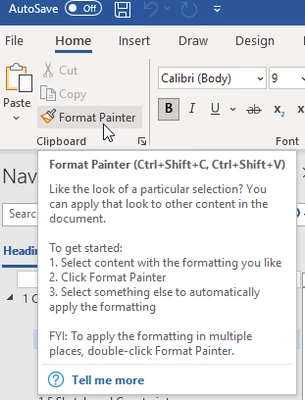
Does Creo Parametrics provide an option to transfer(copy past) the text format similar as in Windows Word the "Format Painter".
Pius_0-1693983295554.png

I know this option from different other CAD tools, but cannot find it in Creo Parametrics.


Does such an option exist? And where can I find it?
Thank's for your support.


Best answer by pausob

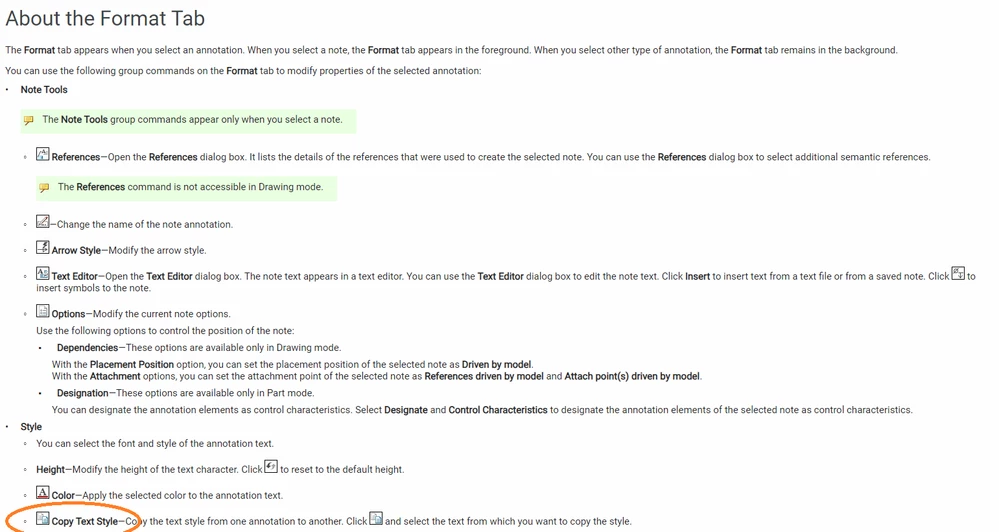
Not the same work-flow direction as the format painter, but I think that:

1) you can select annotation(s?) that you want to change

2) then switch to the "Format" tab, then use the "copy text style" function to make them look like another, already existing text...


pausob_0-1693986379184.png


3 replies

24-Ruby III
September 6, 2023

Hi,

if you want to use different text height for all annotations then you can set default text height.

  • File > Prepare > Model Properties > Detail Options > change
  • set text_height option

Please test whether the above solution works well for you.

Pius14-AlexandriteAuthor
14-Alexandrite
September 6, 2023

Hi Martin Hanak

Unfortunately, this is no option.
As we use different zoom position of the 3D geometry to show details and over all views in combination states, we like to have the text adjusted to this zoom positions.

Thank’s for reply!

Regards

Pius

pausob19-TanzaniteAnswer
19-Tanzanite
September 6, 2023

Not the same work-flow direction as the format painter, but I think that:

1) you can select annotation(s?) that you want to change

2) then switch to the "Format" tab, then use the "copy text style" function to make them look like another, already existing text...


pausob_0-1693986379184.png


Pius14-AlexandriteAuthor
14-Alexandrite
September 6, 2023

perfect!
I did not know it so far 🙂

As improved solution I add the "copy text style" function to the mini toolbar annotation menu.

Pius_0-1693988861476.png

Thank's a lot!

Pius14-AlexandriteAuthor
14-Alexandrite
September 6, 2023

As an very good option I could imagine too, if the Combination State get's this definition and all annotations take-over this format.