
1-Visitor
July 20, 2015
Solved

Mechanica analysis run error with 'internal engine error'

  • July 20, 2015
  • 16 replies
  • 7525 views

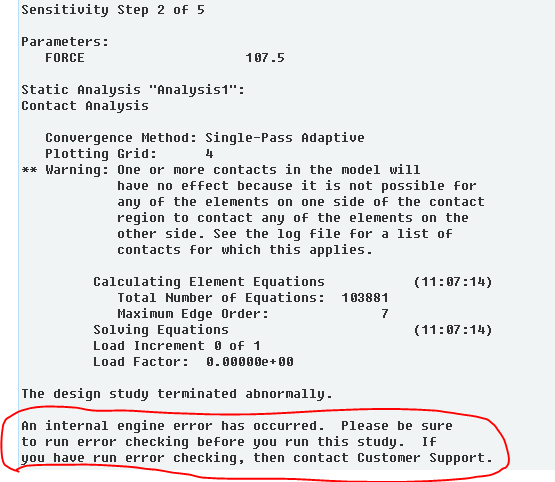
When I run a sensitivity design study, it occurs error at step 2, as rounded below in red spline. The design variable is tensile force. Why did it come out such a error?

This thread is inactive and closed by the PTC Community Management Team. If you would like to provide a reply and re-open this thread, please notify the moderator and reference the thread. You may also use "Start a topic" button to ask a new question. Please be sure to include what version of the PTC product you are using so another community member knowledgeable about your version may be able to assist.
Best answer by unickque

In Creo 3 there is an option to define contact with finite friction. You can set a static and a dynamic coefficient of friction.

I haven't tried it, so can't help you any further with this.

16 replies

Chris3
21-Topaz I
July 20, 2015

That is a general error that gets thrown out for a lot of issues. There is no one issue that causes that. Your best bet is to play a game of wack a mole. Try simplifying the geometry or eliminating boundary or load cases until it goes away. Then start to turn things (like contact interfaces) back one 1 by one until you get the message again. This will tell you what the problem is.

yzhu-21-VisitorAuthor
1-Visitor
July 21, 2015

I'm not exactly sure about your advise. I have tried many methods, but failed.

Chris3
21-Topaz I
July 21, 2015

Have you tried running the analysis with everything welded together (no free or contact interfaces)?