4-Participant
Oct 2, 2025 1:09 PM UTC
Solved

Moving merged balloons bug

Hi! I use merged balloon symbols for multiple component. If this merged balloon symbol is moved the leader always move to the middle and works inconsistently.:

Is there a config key settings to disable this behavior? I think it is a new thing, never happened in previous version of creo (creo8).
I'm using: Creo parametric ver. 10.0.4.0


Thanks in advance!

kdirth
kdirthAnswer
21-Topaz I
Jan 20, 2026 1:26 PM UTC

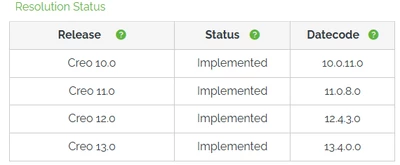
PTC has replied that a resolution will be released in future versions.

kdirth_0-1768915516831.png


There is always more to learn.

9 replies

kdirth
21-Topaz I
Oct 2, 2025 2:01 PM UTC

Looks like the balloons are trying to flip sides when moving from one side to the other.  I have never seen them flip when moved.  In 7.0 and Creo+ (12.0) the balloons I use move without flipping and need to be rearranged by dragging when move from one side to the other.  In your example, you would need to drag 66 & 83 to the other side. 


I do get some jitters from the balloons in Creo+ related to the snapping positions.  The snapping can be turned off in the ribbon (Table > Balloons > Snap To Guides).


You appear to be using a custom BOM balloon.  Can you provide a simple example of a drawing with BOM balloons?

Translate
There is always more to learn.
4-Participant
Oct 7, 2025 1:03 PM UTC

Thanks for your answer! You're right it is a special balloon symbol. With the basic balloon symbol, there isn't any problem when moving.
Unfortunately i didn't find the solution on symbol edit. Symbol is attached.

Translate
kdirth
21-Topaz I
Oct 9, 2025 4:45 PM UTC

I wasn't able to get exactly what you are showing with your balloons.  I did get something similar randomly a couple of times.  Each time I could correct it by dragging the merged balloons to the opposite side of the base balloon.  I was also able to create the issue by clicking on the right spot to get a double arrow as shown in the below video.  I will give it a try in Creo+ later.


Translate
There is always more to learn.