12-Amethyst
November 14, 2023
Question

Multiple surface trim

  • November 14, 2023
  • 3 replies
  • 4037 views

Hello, 

Does Creo have any tool similar to SOLIDWORKS' Surface Mutual Trim. As I have a surface with multiple curves and contours, and I need to delete some of them and keep others.


I'm using Creo 8.
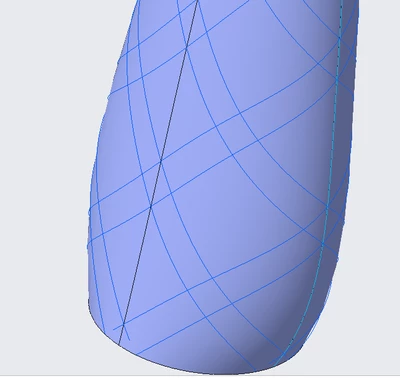
ELDAFRAWY_0-1699957199930.png


3 replies

tbraxton
22-Sapphire II
22-Sapphire II
November 14, 2023

Creo likely has what you need. Can you describe the functionality you need without referencing SolidWorks terminology? A simple description of what you need by annotating your screen shot would work.

ELDAFRAWY12-AmethystAuthor
12-Amethyst
November 14, 2023

Hi, as the image shows I need to create a grid in the shown surface using the projected curve in blue. So, I need to choose surfaces to keep and others to remove.

ELDAFRAWY_0-1699965963176.png


tbraxton
22-Sapphire II
22-Sapphire II
November 14, 2023

That clarifies the problem statement. I have some ideas, but it would depend on how you have built your model to determine which method would be "best".


In Creo you can have only "one" trimming object when using the surface trim.  Did you pattern the curves shown in your image? If so, you may be able to create a single trim and use reference patterns to automate the trim operations. I f I knew I had to create this type of pattern then I would try to exploit the pattern features to realize the required geometry.


You also may be able to use datum reference features to group the curves used to trim the quilt as part of the solution. This will allow you to group curves such that they can be selected as intent objects for use in the trim feature.

Defining Intent Surfaces and Chains (ptc.com)


My guidance for how to do this would be to pattern a datum point on the surface at the centroid of each perimeter "loop" that you need mapped onto the surface of the model. Once you have these points on the surface you can use them to drive reference patterns and minimize the manual creation of features by exploiting the pattern features. This would involve creation of the patches you want to keep in your image above, rather than trimming one large quilt many times to get the result desired,


tbraxton_0-1699966562833.png


If your model is not built in such a way to support the use of reference patterns, then you would need a different approach to leverage your work already completed.


tbraxton
22-Sapphire II
22-Sapphire II
November 14, 2023

I suspect what you are looking for is the merge feature. In the model tab it is found as shown below in yellow.


tbraxton_0-1699963893600.png


About the Merge Feature (ptc.com)


3-Newcomer
November 14, 2023

Hello @ELDAFRAWY 


Please refer to the following article for the corresponding commands in SOLIDWORKS and CREO.


How to search for SolidWorks commands and display their corresponding Creo Parametric commands using the Command Search tool

tbraxton
22-Sapphire II
22-Sapphire II
November 14, 2023

That is not something I would ever use myself but interesting that it is there. I would say that in light of other unresolved core Creo UI issues with open SPRs I tend to question assigning resources to this rather than fixing the things the Creo users find as pain points or broken in the UI. I am sure the justification was to convert users to Creo from SW which I am not opposed to. It probably is not an either-or situation but still makes me wonder about priorities,
