
15-Moonstone
July 8, 2020
Question

Need to make a bi-rail loft

  • July 8, 2020
  • 2 replies
  • 7982 views

I am struggling on something that is extremely simple.  I need to match geometry built originally by customer as a bi-rail loft.  The sections are quite simple but the solution to this is eluding me.

Here is the frame I have to start with.
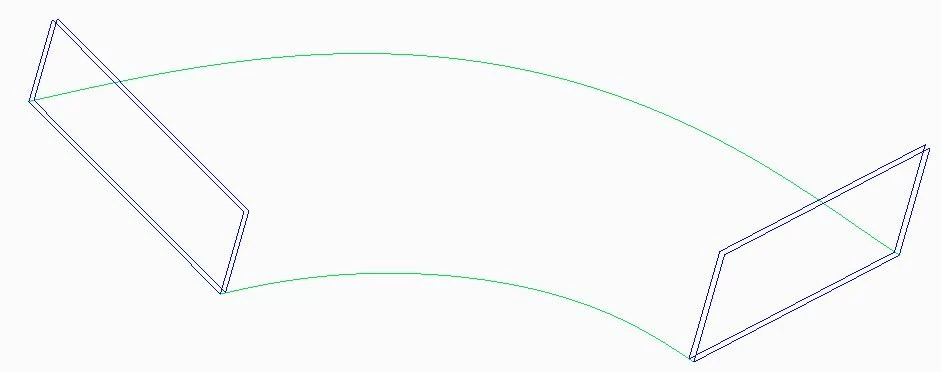
rough frame.jpg

My 1st inclination was to attempt this as a Swept Blend.  I constructed this by choosing 2 reference curves.  As seen below the main reference curve looks great but the solid totally misses the secondary rail.
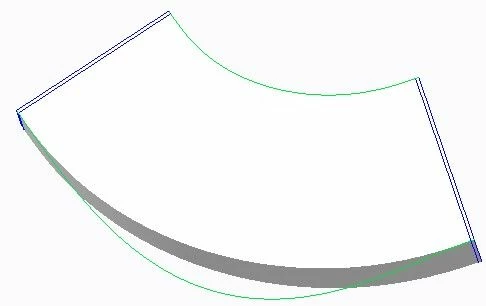
rough frame swept blend.jpg

Another method that I've tried is through using a Boundary Blend.  This would work if the side surfaces didn't want to become the top surface going around the sweep.  I tried playing around with Control Points but in this specific instance it appears that they don't work properly.
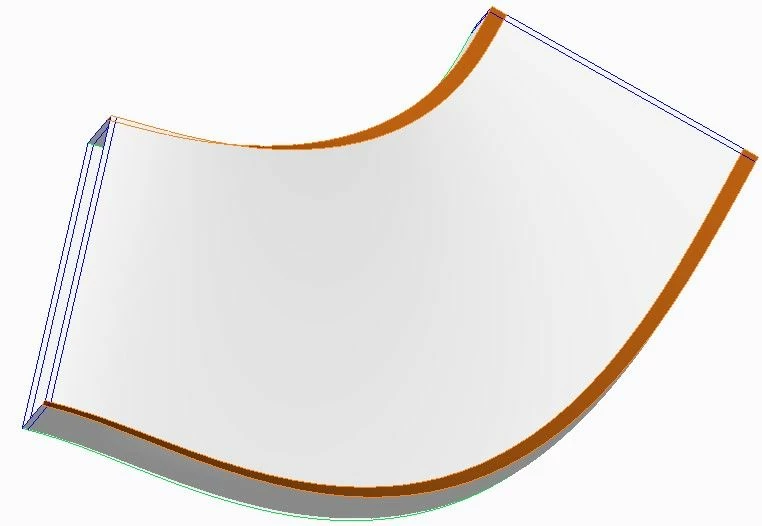
rough frame boundary blend.jpg

I also attempted this as a Sweep but I don't even want to share those results it was so bad.


By any chance is there just a hidden bi-rail loft command in Creo?


If not would anyone have a recommendation for getting a good solid or quilt based off the curves in my top image?


2 replies

19-Tanzanite
July 9, 2020

I'd recommend for you to utilize variable section sweep.

You can add trajectories other than the origin to your sweep and use those to drive the cross-section (use CTRL key after your origin trajectory is defined)

pimm15-MoonstoneAuthor
15-Moonstone
July 9, 2020

Pausob:

I believe I tried this as a Variable Section Sweep.

VSS.jpg

This is what happens.  I tried different settings.

VSS result.jpg

24-Ruby III
July 9, 2020

@pimm wrote:

I am struggling on something that is extremely simple.  I need to match geometry built originally by customer as a bi-rail loft.  The sections are quite simple but the solution to this is eluding me.

Here is the frame I have to start with.

rough frame.jpg

My 1st inclination was to attempt this as a Swept Blend.  I constructed this by choosing 2 reference curves.  As seen below the main reference curve looks great but the solid totally misses the secondary rail.

rough frame swept blend.jpg

Another method that I've tried is through using a Boundary Blend.  This would work if the side surfaces didn't want to become the top surface going around the sweep.  I tried playing around with Control Points but in this specific instance it appears that they don't work properly.

rough frame boundary blend.jpg

I also attempted this as a Sweep but I don't even want to share those results it was so bad.


By any chance is there just a hidden bi-rail loft command in Creo?


If not would anyone have a recommendation for getting a good solid or quilt based off the curves in my top image?


Hi,

I think if you upload your "startup" model containg curves, somebody can experiment with it ...

pimm15-MoonstoneAuthor
15-Moonstone
July 9, 2020

Martin,

If I could figure out how to attach a file I could try sending a file.  I pared this out of the imported model.  No guarantees if I could get the file uploaded anyone could even open it.  I see an Insert/Edit link from the tools but it is looking for a URL. 


Since yesterday's post I was able to successfully build the boundary blend without kinks but it did not match up with the solid shape that it should represent.  The rail side and end frames were perfect but the opposing depth was considerably short of what the geometry I need to match with is.  (I was able to figure out how to use the Control Points in this application).


24-Ruby III
July 9, 2020

@pimm wrote:

Martin,

If I could figure out how to attach a file I could try sending a file.  I pared this out of the imported model.  No guarantees if I could get the file uploaded anyone could even open it.  I see an Insert/Edit link from the tools but it is looking for a URL. 


Since yesterday's post I was able to successfully build the boundary blend without kinks but it did not match up with the solid shape that it should represent.  The rail side and end frames were perfect but the opposing depth was considerably short of what the geometry I need to match with is.  (I was able to figure out how to use the Control Points in this application).


Hi,

if you want to upload Creo files, pack them into single zip file and attach this zip file. Unfortunatelly it is not possible to upload Creo files with double extension.