
15-Moonstone
February 6, 2013
Question

offset sketch bug still there in creo 2.0 M030

  • February 6, 2013
  • 3 replies
  • 6004 views

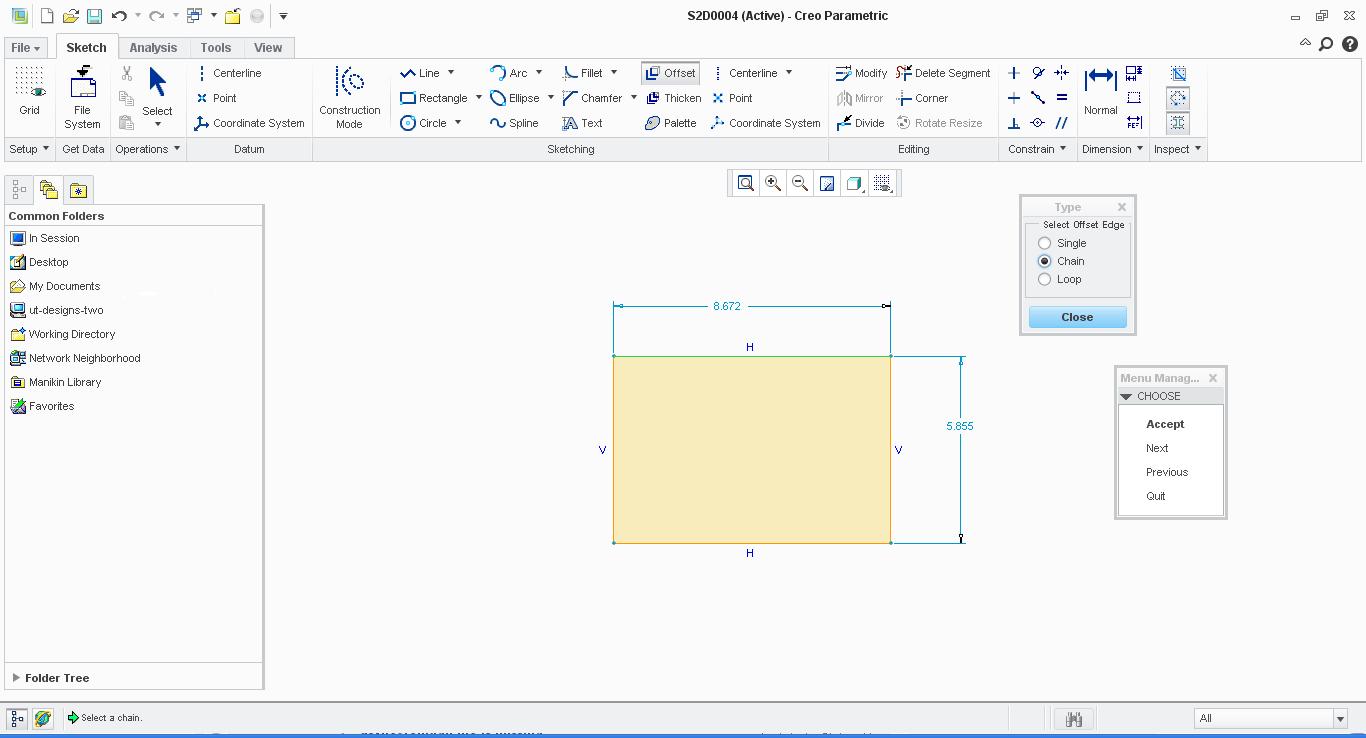
just checked the offset sketch bug in creo 2.0 is still there in M030 also. below is the picture..as you can see it does not highlight the chain. could somebody please show it to Creo developers.offset+sketch.JPG

This thread is inactive and closed by the PTC Community Management Team. If you would like to provide a reply and re-open this thread, please notify the moderator and reference the thread. You may also use "Start a topic" button to ask a new question. Please be sure to include what version of the PTC product you are using so another community member knowledgeable about your version may be able to assist.

3 replies

17-Peridot
February 6, 2013

You have to select 2 edges, and then you can toggle through the solutions with the "next" option. Accept and you will get annoying message telling you the endpoints of the chain are coincident and asks if you want to convert them to a loop. I don't really get that one.

Of course, you can always select the loop too.

Yep, Creo 2.0 M030.

15-Moonstone
February 6, 2013

HI,

the issue is only when selecting sketch entity..with edges the option works fine.

24-Ruby III
February 6, 2013

Rohit,

I can reproduce the problem. I add some details for other users.

1.]

The problem is related ONLY to highlighting current variant of offset, when user selects two sketched entities.

When user selects two sketched entities -> Creo does not offer variant no.1.

When user clicks Next -> Creo does not offer variant no.2.

2.]

When user clicks Accept -> Creo is able to create offset entities, but user cannot choose the right variant.

3.]

The problem will not show when user selects two edges.

Martin Hanak

15-Moonstone
February 6, 2013

thanks Martin...that's correct. The issue is only with sketch entity selection. I just want that it is rectified.

17-Peridot
February 6, 2013

Thanks for the clarification.

I was able to offset lines from a sketch if it was a -previous- sketch with all the appropriate highlighting.

When I tried offsetting the edges in the current sketch, the highlighting fails... but the offset for both loop and the second variant of the chain works.

Pretty annoying indeed Have you reported this (again) Rohit?

Patriot_1776
22-Sapphire II
February 7, 2013

This is a comment in general: I find AutoCAD's 2D sketching abilities FAR exceeds what you can do in Pro/E, ESPECIALLY in drawing mode. It's gotten a LITTLE better (emphasis on "little"), but still lags far behind. Why did it take so long to get polygons (AutoCAD had them in the late '80's)? Why can't we create polylines (from a combination of lines, arce, and/or splines)and offset them in sketcher? We can offset edges or chains in sketcher from geometry that already exists in a previous feature, but why can't we do it in sketcher itself? I mean, eventually you can get the sketch you need, but it is such a pain to do it. Having a competent 2D sketcher would be a trmendous timesaver. Also, we need the ability to import geometry (from dwg or a DXF) and be able to import it as a "block", like A/C. where we can scale the block as a whole, and not have ot try and establish constraints. Trying to do logo's (for extrusions or even datum curves) in sketcher is a total nightmare.

1-Visitor
February 7, 2013

Too true, even tho AutoCAD isn't the best for curve editing out there.

It's just too bad, PTC will have to go long ways to accomplish anything like this.