

"Open" vs "Open Automatic"
Hi everybody,
Today I am writing with the following issue. (Sorry for not being able to post pictures, but I cannot do it because of the confidenciality policy in my company)
I got an assembly with the tree structure you can see below, and I had to replace the casing for a new one:
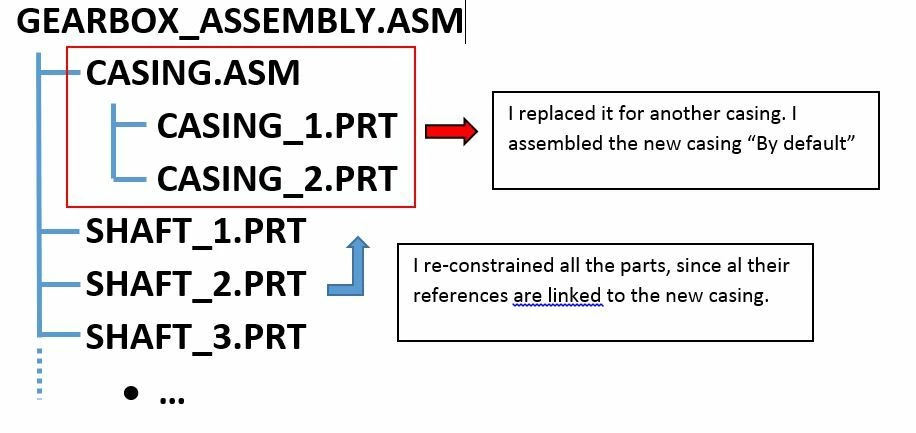
The new casing was placed in the wrong spot, so I arranged it so that it is located ·By "Default" in the right one . Then, I re-constrained all the parts below in the tree respect to the new casign.
Until here, everything fine. I saved the work into our PLM software and it looked OK .
After a while, I realized that in our visualization sofware the shafts were still in the old position, while the casing was in a different one.
If I "Open" GEARBOX_ASSEMBLY.ASM, I see on Creo what I did (casing in the desired spot, and all the parts constrained respect to it, all in the right position).
But, if I open "GEARBOX_ASSEMBLY.ASM" using the option "Open Automatic" the items "Casing.asm" and "Shaft_1.prt", "Shaft_2.prt", are really far one each other.
So, if looks as if "Open Automatic" does not respect the constrains I entered when modifying the assembly... and the questions arising from this story are the following ones:
1. What is the difference between "Open" and "Open Automatic"?
2. How can edit the lay-out so that I get the same result opening the assembly on both ways?
I hope I managed to explain the issue properly, but if someone needs more info, do not hesitate to ask for it.
Thanks you all in advance!
C.Reoyo