10-Marble
August 15, 2023
Solved

Opening .sldprt

  • August 15, 2023
  • 3 replies
  • 3203 views

Hi all,

I am trying to open a .sldprt and everytime I open it, my creo just freezes.

I have tried multiple different .sldprt's and all of them cause this issue.

Is there anything I can do to get these to open?

I never had this issue in Creo4.0


I am currently using Creo8.0
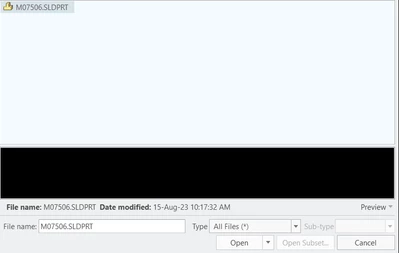
 

JG_10559632_0-1692112945010.png


Best answer by BenLoosli

What version of Solidworks was the file created in?

What version of Creo 8 (8.0.X.0, what is your X) are you using?

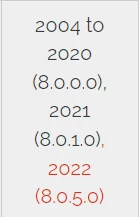
Here is the import compatibility chart for Creo 8 and Solidworks.

BenLoosli_0-1692114005962.png


3 replies

23-Emerald III
August 15, 2023

Are they large files?  Have you tried rebooting?

 Try also importing into an existing new part file instead of just opening.

Also, try turning off ATB, which could be causing issues.

If you are connected to windchill, that sometimes causes delays based on it searches for the same name, but usually that more of a problem with assemblies but you could try with creo in Offline mode to rule that out.

BenLoosli23-Emerald IIIAnswer
23-Emerald III
August 15, 2023

What version of Solidworks was the file created in?

What version of Creo 8 (8.0.X.0, what is your X) are you using?

Here is the import compatibility chart for Creo 8 and Solidworks.

BenLoosli_0-1692114005962.png


10-Marble
August 15, 2023

Ah, I see.

We are using 8.0.0.0 , but I do believe these files are pre-2004. So I guess the files are just gone and I will have to remake them in Creo.


Thank you for your help!

23-Emerald III
August 15, 2023

These are the datecodes that PTC has confirmed works but they are not always the limits..

Even creo 4 showed it wasn't compatible pre 2004

https://www.ptc.com/en/support/article/CS275340


StephenW_0-1692114792989.png


StephenW_1-1692114810853.png


jbailey
18-Opal
August 15, 2023

Make sure it is not an issue with being blocked by something. We are experiencing an issue where, over VPN, the exe that handles the opening of the SW file is getting blocked, but there is no prompt for something like Windows Defender. PTC claims it is an issue with our VPN, but we have yet to be able to nail it down. Is the computer logged onto a VPN? If so, test when it is not connected to the VPN.


Creo initiates other things on the same computer using local host or 127.0.0.1 - my best guess here (at least) is that our VPN is blocking calls to localhost or the loopback address (127.0.0.1).  Just a theory so far, as we haven't been able to find the root cause yet. We noticed this also happens with clock.exe (if you have clock yes on the config.pro) - Creo will just hang when trying to start.


Then again, this may be something completely unrelated 🙂