1-Visitor
March 11, 2014
Solved

Override value in Dim Properties will not work.

  • March 11, 2014
  • 5 replies
  • 2666 views

Hell I'm trying to fake in some dimension but everytime I enter the value I want in he override value box and hit enter or "OK" it changes back to the oringal dim.[URL=http://smg.photobucket.com/user/Djstorm100/media/Pro-E/2014-03-1109-09-08_mti_work_pcContains_zps3f977ae6.jpg.html][IMG]http://img.photobucket.com/albums/v512/Djstorm100/Pro-E/2014-03-1109-09-08_mti_work_pcContains_zps3f977ae6.jpg[/IMG][/URL]


This thread is inactive and closed by the PTC Community Management Team. If you would like to provide a reply and re-open this thread, please notify the moderator and reference the thread. You may also use "Start a topic" button to ask a new question. Please be sure to include what version of the PTC product you are using so another community member knowledgeable about your version may be able to assist.
Best answer by StephenW

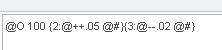
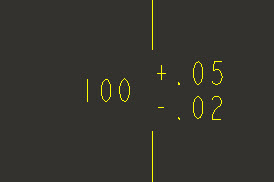
If it is a created dimension in the drawing, you can use the @o as described above and to get the tolerance, you can use the superscript/subscript functionality.

super-sub2.jpg

super-sub.jpg

@O 100 {2:@++.05 @#}{3:@--.02 @#}

5 replies

Dale_Rosema
23-Emerald IV
March 11, 2014

Don't for the the @O ("oh" not zero - my trick to remember this is that you are going to own the dimension yourself by overiding it - a bunch of O's).

So @O 13.375" should show up as 13.375"

At least this is old school and should be done in the display tab. Not sure of the overide feature there.

Thanks, Dale

dholloman1-VisitorAuthor
1-Visitor
March 11, 2014

Right, but at the same time if I need to place +0.05 and -0.2 tolerance it will not let me place those.

Dale_Rosema
23-Emerald IV
March 11, 2014

Not as nice, but:

@O 13.375 +0.05/-0.20

is an option.