
14-Alexandrite
July 10, 2023
Solved

OVERSIZED WINDOWS VIEW

  • July 10, 2023
  • 2 replies
  • 1340 views

Hi, how can I resize the view window based on solid model?

I'm using CREP PARAMETRIC 9.

I have the necessity of draw a surface "Area designata 1" in an assembly, then I have to hide the surface in drawing.
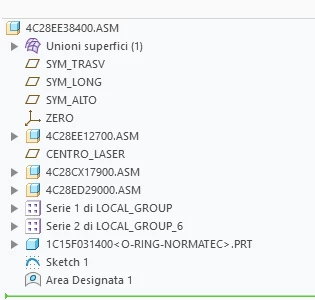
MB_10508968_1-1688992845165.png


Althought I hide the surface, the view window is oversized because it feels the presence of the surface. The oversize of view window causes problem of views overlapping.
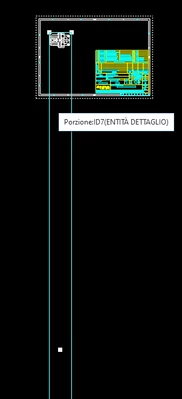
MB_10508968_0-1688992650673.png


How can I resolve this problem?

Kings regards.


Michele Barile

 

Best answer by StephenW

A different way to do this is instead making the surface feature "Area designata 1" in the top level, make the part that contains the surface feature, then use simplified reps to turn off the part. 

2 replies

StephenW
23-Emerald III
July 10, 2023

I usually make these sorts of views a Partial view (in the view properties) and sketch the boundary so it controls how large the view is. Not automatic by any means but effective.

14-Alexandrite
July 10, 2023

I won't tu apply a partial view, because the assembly is too large and I want to apply an interrupted view too.

StephenW
StephenW23-Emerald IIIAnswer
23-Emerald III
July 10, 2023

A different way to do this is instead making the surface feature "Area designata 1" in the top level, make the part that contains the surface feature, then use simplified reps to turn off the part.