
1-Visitor
October 21, 2013
Solved

parameters in mechanism connections do not update?

  • October 21, 2013
  • 3 replies
  • 2737 views

For example:

Ive created a cylinder assembly of which all relevant dimensions are driven by a list of parameters.

Whenever I create a copy of the cilinder with new dimensions, The max extension of the rod is also parameter driven and should therefore also update when I change this length. Sadly this does not work. I can fill in the parameter (in this case: "SLAG" pardon my Dutch) and the parameter changes into the number, but will not update after.


Any ideas?
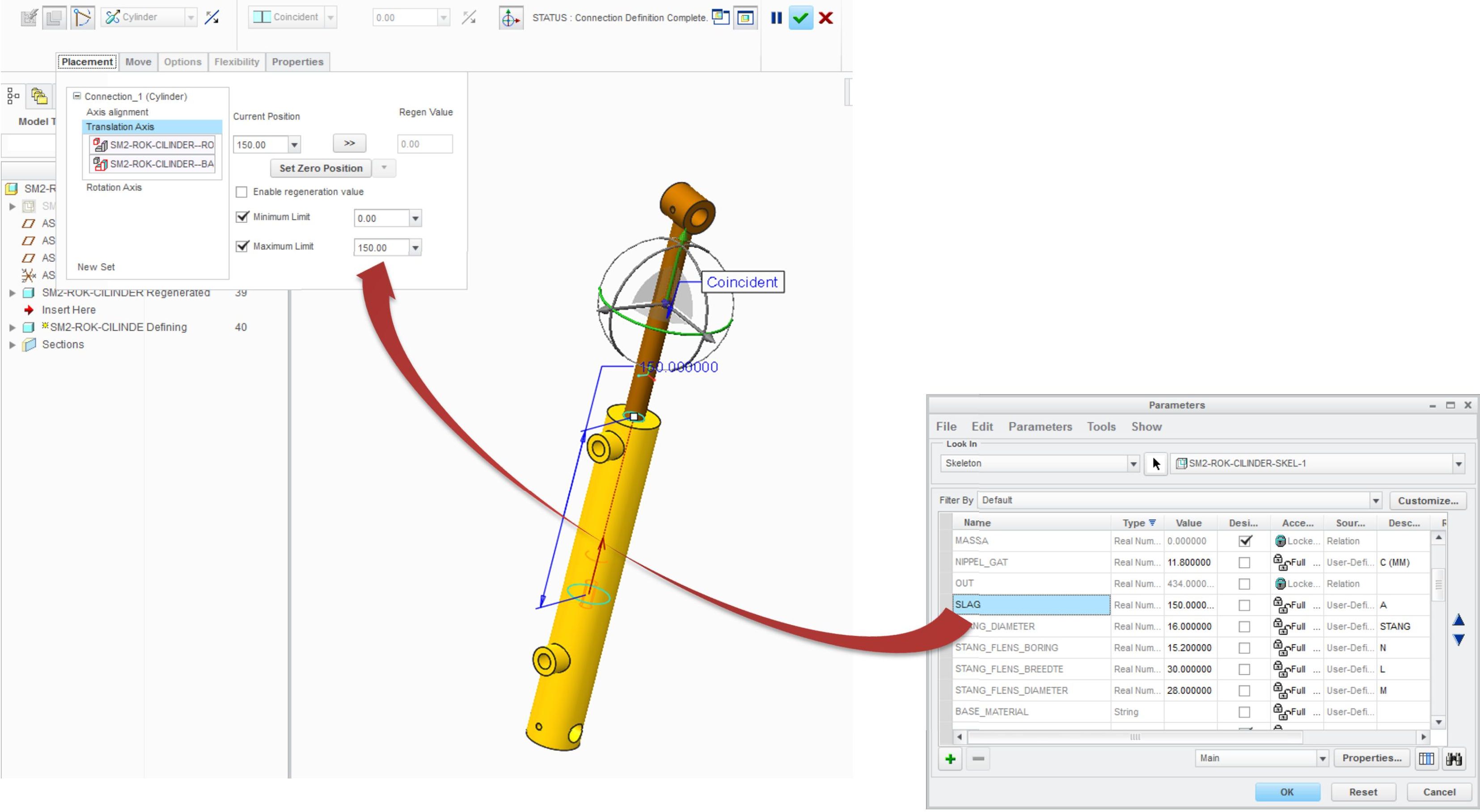
 

cilinder2.jpg


This thread is inactive and closed by the PTC Community Management Team. If you would like to provide a reply and re-open this thread, please notify the moderator and reference the thread. You may also use "Start a topic" button to ask a new question. Please be sure to include what version of the PTC product you are using so another community member knowledgeable about your version may be able to assist.
Best answer by vzak

That's correct suggestion Martin.

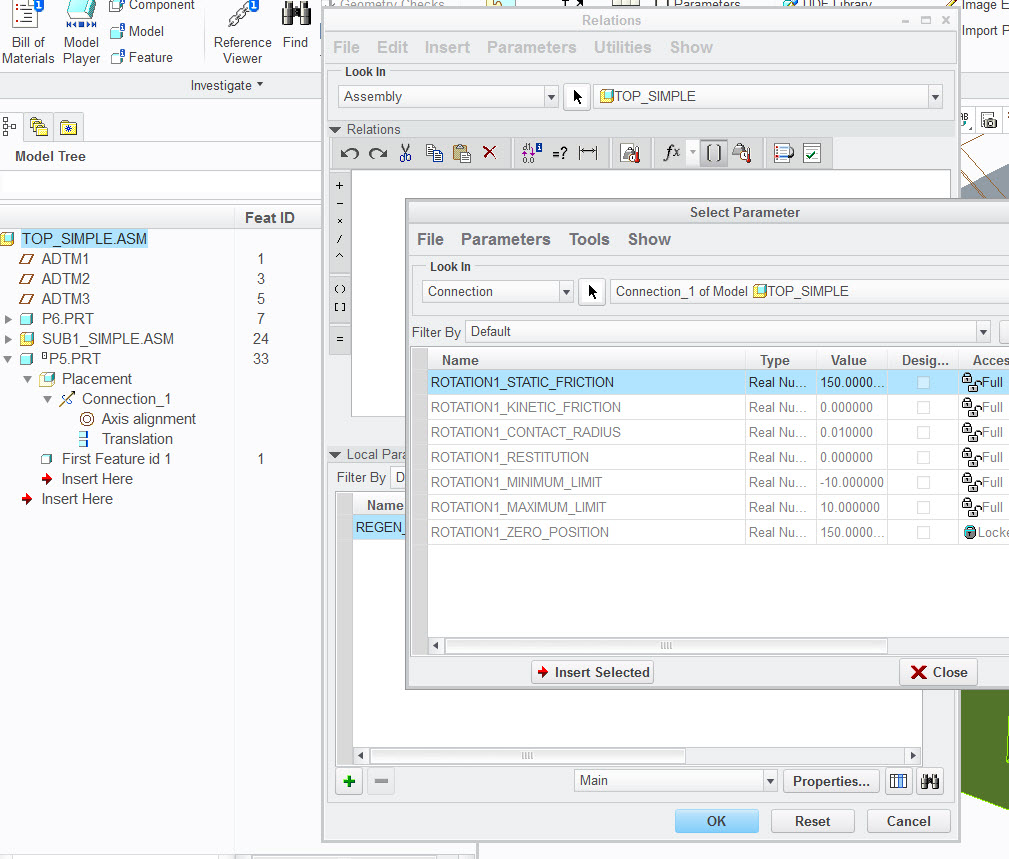
Any connection related constants are represented as "connection parameters" :. For Pin rotation axis for e.g. we have :

ROTATION1_STATIC_FRICTION

ROTATION1_KINETIC_FRICTION

ROTATION1_CONTACT_RADIUS

ROTATION1_RESTITUTION

ROTATION1_MINIMUM_LIMIT

ROTATION1_MAXIMUM_LIMIT

ROTATION1_ZERO_POSITION

So to drive connection parameter by any model parameter it will be best to create component level relation, like :

ROTATION1_ZERO_POSITION:CONN_2 = ZERO_POS_PARAM

where correct connection postfix (CONN_2) is obtained automatically when you select parameter in Relations / Insert Parameter from Name List / (select Connection subtype) / pick corresponding connection in Model Tree.

connection_parameter_selection.jpg

3 replies

24-Ruby III
October 22, 2013

Hi,

I guess that you have to define a relation, which puts model parameter value into mechanism maximum limit. Unfortunatelly I am not sure if it is possible to define such relation.

Martin Hanak

vzak12-AmethystAnswer
12-Amethyst
October 22, 2013

That's correct suggestion Martin.

Any connection related constants are represented as "connection parameters" :. For Pin rotation axis for e.g. we have :

ROTATION1_STATIC_FRICTION

ROTATION1_KINETIC_FRICTION

ROTATION1_CONTACT_RADIUS

ROTATION1_RESTITUTION

ROTATION1_MINIMUM_LIMIT

ROTATION1_MAXIMUM_LIMIT

ROTATION1_ZERO_POSITION

So to drive connection parameter by any model parameter it will be best to create component level relation, like :

ROTATION1_ZERO_POSITION:CONN_2 = ZERO_POS_PARAM

where correct connection postfix (CONN_2) is obtained automatically when you select parameter in Relations / Insert Parameter from Name List / (select Connection subtype) / pick corresponding connection in Model Tree.

connection_parameter_selection.jpg

bp_011-VisitorAuthor
1-Visitor
October 22, 2013

Cheers Vladimir,

Works like a charm.