10-Marble
February 2, 2023
Solved

Part hollow

  • February 2, 2023
  • 3 replies
  • 3353 views

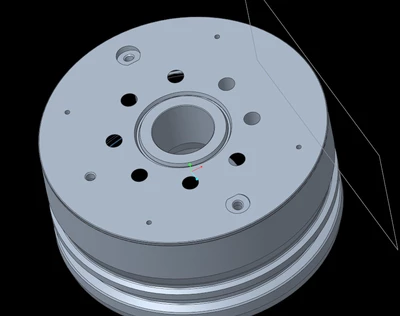
I have revised a part that was perfectly fine. Now it is hollow on the inside after adding 2 features. Any ideas how to fix this?

 

JG_10559632_0-1675350358096.png


Best answer by JG_10559632

Hi all,

I have figured out my issue.

For my hole references I was using the right plane (align) and the front plane (8.75). The part would turn hollow.

I now change the front plane reference to the CL axis at 8.75 and the part is happy.


Probably just stupidity on my end, but not quite sure why that made the part happy.

3 replies

tbraxton
22-Sapphire II
22-Sapphire II
February 2, 2023

Not enough information to offer an explicit solution.


Post the model for review. Identify which version of Creo you are using.


To debug this, go into insert mode or use the model player to find out which feature is causing the undesired geometry. Once you identify which feature it is then reroute/redefine it to reflect design intent.


How to use the model player:

https://support.ptc.com/help/creo/creo_pma/r9.0/usascii/index.html#page/fundamentals/fundamentals/Using_the_Model_Player.html 

10-Marble
February 2, 2023

JG_10559632_0-1675352485437.png

If I add a hole where I drew the red box here, it goes to hollow.
The hole is not intersecting anything else other than the reference surface. I have tried referencing the hole off of a plane and nothing, it still makes the part hollow. Creo8.0

24-Ruby III
February 2, 2023

Hi,

what happens when you cut off one half of your model. If this action produces hollow geometry then model geometry is incorrect.

-OR-

Your model is surface model, not the solid one.

23-Emerald IV
February 2, 2023

Was this modeled natively in Creo or imported from somewhere else?  (Online vendor's models, etc.)

JG_1055963210-MarbleAuthorAnswer
10-Marble
February 2, 2023

Hi all,

I have figured out my issue.

For my hole references I was using the right plane (align) and the front plane (8.75). The part would turn hollow.

I now change the front plane reference to the CL axis at 8.75 and the part is happy.


Probably just stupidity on my end, but not quite sure why that made the part happy.

Dale_Rosema
23-Emerald III
23-Emerald III
February 2, 2023

What version of Creo are you using?